Tutorials

Tutorials

Tutorials

How to connect your finances to Claude using the Truthifi MCP (step-by-step)

Truthifi Connect is an MCP server: it lets Claude read your real financial data from Truthifi when you ask questions about your money. Once it's set up, you can ask Claude things like "what's my net worth across all my accounts?" or "which of my funds have the highest fees?" and get answers based on your actual numbers, not estimates.

This page walks through the exact steps to connect Truthifi to Claude.

What is MCP, and why does it matter here?

MCP stands for Model Context Protocol. If you've been wondering what MCP means, here's the short version: it's an open standard created by Anthropic that lets AI tools like Claude connect to external data sources and services. Think of it as the layer that makes it possible for Claude to go beyond its training data and access live, real-world information on your behalf.

An MCP server is what sits on the other side of that connection. Truthifi Connect is an MCP server: it exposes your financial data through a standardized interface that Claude knows how to query. When you ask Claude a question about your finances, Claude calls the Truthifi MCP server, retrieves the relevant data, and uses it to answer you directly.

The mcp meaning in practical terms is simple: instead of copying and pasting your account balances into Claude, or uploading a spreadsheet, Claude can just ask Truthifi for the data itself. Automatically, in real time, every time you ask.

What you need before you start

You'll need two things:

A Truthifi account with your financial accounts connected. If you haven't done that yet, see [how to add your first account to Truthifi] first.

A paid individual Claude subscription. Claude MCP connectors are available on Pro and Max plans. If you're on a team or enterprise account, your admin may need to enable custom connectors before this will work.

Step-by-step: connecting Truthifi to Claude

Step 1: Go to Settings > Customize > Connectors. In Claude, open Settings. Navigate to Customize, then select Connectors from the left panel.

Step 2: Add a custom connector. In the top right of the Connectors panel, click the plus icon and select "Add custom connector."

Step 3: Enter the Truthifi MCP URL. You'll be prompted for a nickname and a URL. Enter any nickname you like ("Truthifi" works well) and paste in the Truthifi MCP URL: https://api.truthifi.com/mcp. Click Add.

Step 4: Click Connect. Truthifi will now appear in your connectors list. Click into it and you'll see a Connect button. Click it.

Step 5: Log in and authorize. This opens a Truthifi authorization screen. Log in with your Truthifi account. You'll see a list of what Claude will be able to access: your portfolio summary, holdings and transactions, and account details. Click Authorize to confirm.

Step 6: Done. You're connected. Truthifi will appear as an active connector in your Claude settings.

Understanding tool permissions

Once connected, your Claude connector settings will show a list of individual tool permissions for Truthifi, things like get_accounts, get_fees, get_equity_concentrations, and more. Each one is set to "Needs approval" by default.

"Needs approval" means Claude will ask you to confirm before pulling that specific type of data. If you'd prefer Claude to access your data automatically without confirming each time, you can change individual permissions to allow. You can also restrict specific data types if you prefer Claude not to access them at all.

These permissions give you granular control over exactly what Claude can see from your Truthifi account.

What to ask once you're connected

Once Truthifi is connected, try asking Claude something like:

"What is my current net worth across all my accounts?" "Which of my investment accounts have the highest fees?" "How much did I spend on groceries last month?" "What's my largest equity concentration?"

Claude pulls live data from Truthifi to answer each of these. The quality of the answers depends on having your accounts properly connected in Truthifi first, since Claude is reading from whatever Truthifi has synced.

For more prompt ideas, visit the [Truthifi prompt gallery].

Frequently asked questions

What is MCP? MCP stands for Model Context Protocol. It's an open standard that allows AI tools like Claude to connect to external data sources and services. Truthifi Connect is an MCP server that gives Claude read-only access to your financial data.

What does MCP mean in AI? In the context of AI, MCP meaning refers to the protocol that enables AI assistants to access live, external data rather than relying only on their training data. For Truthifi, it means Claude can query your real account balances, holdings, and transactions rather than working from information you paste in manually.

Do I need a paid Claude subscription? Yes. Custom MCP connectors require a paid individual Claude subscription (Pro or Max). Team and enterprise users may need their admin to enable the feature first.

Is this the same as Claude's built-in memory or web search? No. Truthifi Connect is a separate data source. It gives Claude access specifically to your Truthifi financial data, not general web information. Claude's memory and web search remain separate features.

Can Claude make changes to my accounts? No. Truthifi's MCP server is strictly read-only. Claude can retrieve your financial data but cannot initiate transactions, move funds, or change anything in your accounts.

What data can Claude access? Claude can access the data types listed in your Truthifi connector permissions: portfolio summary, holdings and transactions, account details, fees, equity concentrations, balance history, and more. You control exactly which data types are enabled from your connector settings.

Is my financial data safe? Yes. The connection is read-only and authorized by you. Truthifi never gives Claude write access to your accounts, and you can disconnect at any time from your Claude connector settings.

Get started free at truthifi-connect.ai. New to Truthifi? Set up your account at truthifi.com first.

Your first financial checkup: how to read your Truthifi wellness score

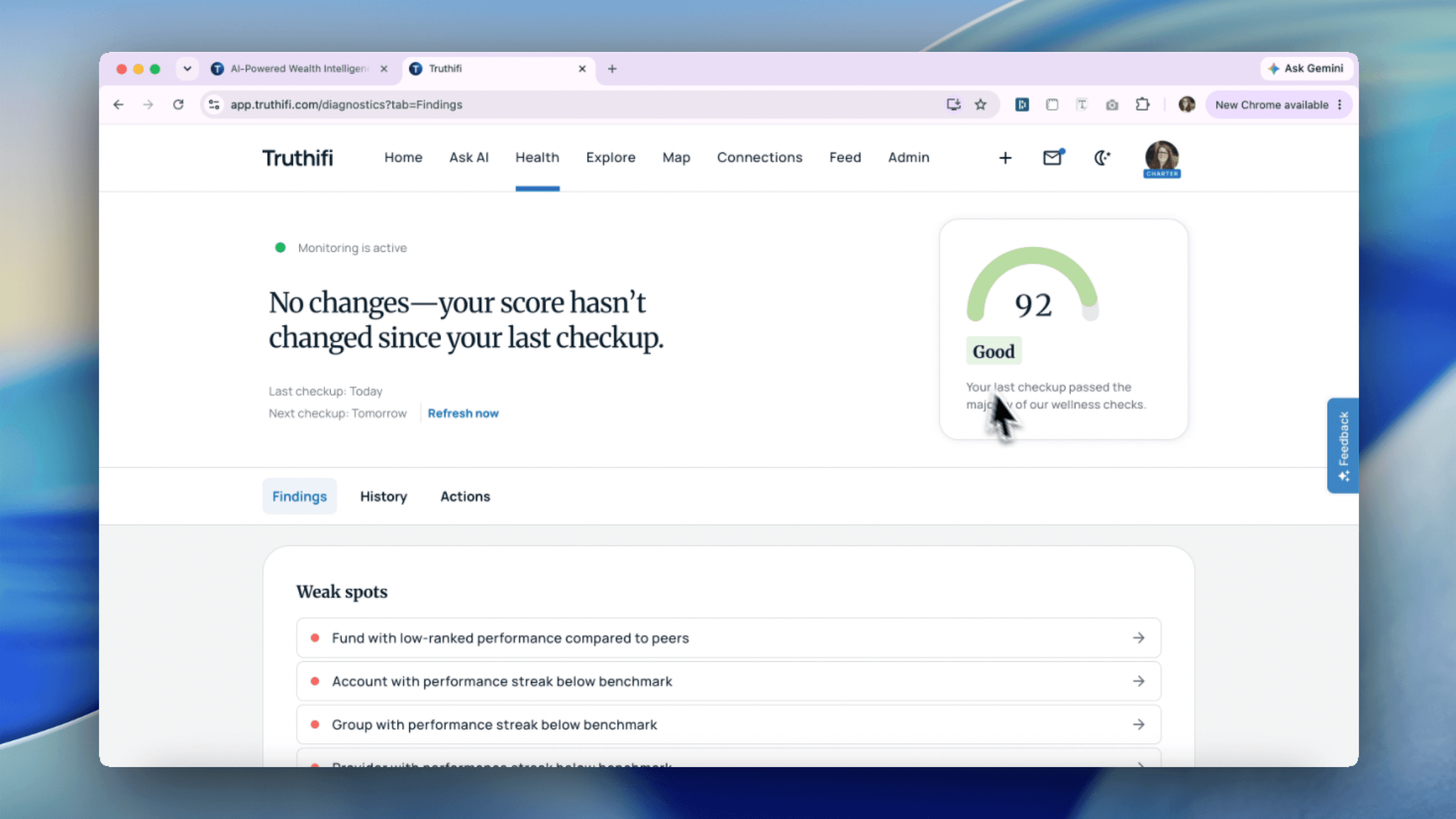
Once your accounts are connected, Truthifi doesn't just show you your balances. It runs an automated financial checkup across your entire financial picture and surfaces a wellness score: a diagnostic that tells you, specifically, where your finances look solid and where there might be something worth paying attention to.

This page explains what the wellness score is, how to read each check, and how to use the findings to actually improve your financial health over time.

What is a financial wellness score?

Financial wellness is a broad term that gets used loosely, but in Truthifi it has a specific meaning. Your wellness score is the result of 130+ automated checks run across all your connected accounts. Each check looks at something concrete: whether your cash reserves would cover an unexpected expense, whether you're paying above-market fees, whether your portfolio is concentrated in a way that adds risk you might not have intended, whether your asset allocation matches your investment horizon, and dozens more.

The score is not a credit score. It doesn't leave Truthifi, it doesn't affect your ability to borrow money, and it isn't shared with any third party. It exists entirely to give you an honest read on your financial health, the same kind of read a financial advisor would run through during a proper review, done automatically and updated continuously.

A good financial health check isn't about whether your numbers are big or small. It's about whether your finances are set up in a way that's working in your favor. That's what the wellness score is trying to tell you.

How to read your wellness score

Your wellness score appears at the top of your Truthifi dashboard after your accounts have synced. The number itself is less important than the breakdown underneath it.

Below the overall score, you'll see your checks organized by category. Each category covers a different dimension of your financial health: liquidity, fees, portfolio structure, risk, and so on. Categories with flagged checks will show you how many items need attention. Categories where everything looks healthy will show as passing.

This structure is intentional. A single number tells you very little about your financial wellbeing. A breakdown by category tells you whether a low score is a fee problem, a cash reserve problem, a concentration problem, or some combination. That distinction matters because the fixes are completely different.

What a flagged check means

When a check is flagged, Truthifi is telling you something specific is worth looking at. Click into any flagged check and you'll see exactly what triggered it: which account, what the issue is, and where relevant, what the potential impact looks like over time.

For example, a fee check might flag that a particular fund in your portfolio has an expense ratio significantly above comparable alternatives. A concentration check might flag that a single stock represents an unusually large share of your total portfolio. A cash reserve check might flag that your liquid savings would cover less than the standard three months of expenses.

None of these are emergencies. They're observations. The goal of a financial health check is to surface things you might not have noticed, not to alarm you. What you do with a flagged check is entirely up to you.

What a passing check means

Not every check will be flagged, and that's useful information too. Knowing that your emergency fund coverage looks solid, that your expense ratios are reasonable, or that your portfolio isn't dangerously concentrated is genuinely good to know. Financial wellbeing isn't just about finding problems; it's about understanding where you stand.

Checks that pass will show as green. You don't need to do anything with them, but they're worth reading once to understand what Truthifi looked at and what it found.

How the wellness score updates

Your wellness score isn't a one-time report. It updates automatically as your financial picture changes: when balances shift, when you add new accounts, when holdings change. If you pay down a debt, consolidate accounts, or switch funds, the relevant checks will re-run and the score will reflect your updated situation.

This is what makes it a useful tool for ongoing financial health assessment rather than a snapshot you look at once and forget. A good financial health check should be a habit, not a one-off event.

Frequently asked questions

What is a financial wellness score? A financial wellness score is a diagnostic that evaluates your financial health across multiple dimensions: cash reserves, fees, portfolio structure, risk, and more. In Truthifi, it's the result of 130+ automated checks run across all your connected accounts. It's designed to give you a specific, actionable read on your finances rather than a vague rating.

Is the Truthifi wellness score the same as a credit score? No. The Truthifi wellness score is an internal diagnostic. It doesn't affect your creditworthiness, it isn't shared with lenders or third parties, and it has nothing to do with your credit history. It's a private tool for understanding your own financial health.

What does financial health mean? Financial health refers to how well your overall financial situation is set up to support your goals and absorb unexpected costs. A financial health check typically looks at things like liquidity (can you cover emergencies?), efficiency (are you paying unnecessary fees?), stability (is your portfolio appropriately diversified?), and progress (are you on track for your goals?). Truthifi automates this kind of assessment across your connected accounts.

How often does the wellness score update? Automatically, whenever your account data syncs. You don't need to trigger a manual refresh.

What should I do if a check is flagged? Read the detail view for that check. It will tell you exactly what triggered the flag and which account is involved. From there, you can decide whether it's something you want to act on. Truthifi surfaces the finding; what you do with it is up to you.

How is this different from a financial health calculator? A financial health calculator typically takes inputs you provide manually and runs a single calculation. Truthifi's wellness score pulls live data from all your connected accounts and runs 130+ checks continuously. It's a financial health assessment, not a one-time calculation.

Get started free at truthifi.com. Want to ask questions about your wellness score in plain language? Try Truthifi Connect to pipe your financial data into Claude or ChatGPT.

Connecting your accounts to Truthifi: here's how it works

Connecting your bank, brokerage, and retirement accounts is the first step to getting value from Truthifi. Most people pause here, not because it's complicated, but because handing a third-party app access to your finances feels like a big ask. That hesitation is worth taking seriously. This article explains exactly what happens when you connect, who handles your credentials, how financial data aggregation works, and why the process is designed to keep you in control at every step.

What is Plaid, and why does Truthifi use it?

If you've used a personal finance app in the last few years, you've almost certainly used Plaid without knowing it. Plaid is a financial data aggregation company: it specializes in creating secure, standardized connections between consumer bank accounts and third-party apps. It powers connections for thousands of products including Venmo, Robinhood, Coinbase, and Betterment. In the world of account aggregation, Plaid is the most widely recognized name, but it's one of several providers operating in this space.

Truthifi also uses Yodlee and ByAllAccounts, two other established financial data aggregation providers. Yodlee has been in the financial data business since 1999 and connects to a large range of institutional and retail accounts. ByAllAccounts specializes in wealth management and investment account aggregation, which makes it particularly useful for connecting brokerage and retirement accounts that some other providers don't cover as well.

So when you ask "what is Plaid banking" or "what is a financial data aggregator," the short answer is: it's a regulated intermediary that sits between your bank and apps like Truthifi. It authenticates you, retrieves your data, and passes it along in a standardized format, without the app ever needing to know your password.

Is Plaid safe to use? What about Yodlee and ByAllAccounts?

This is one of the most common questions people have before connecting their accounts, and it's a fair one. The short answer is yes, but here's why.

Plaid, Yodlee, and ByAllAccounts are all regulated financial data companies. They use bank-level encryption, they do not store your full login credentials after the initial authentication, and they are subject to oversight from financial regulators. Plaid in particular has undergone significant regulatory scrutiny and has published detailed documentation on its security practices at plaid.com/safety.

More importantly: your credentials never reach Truthifi at all. When you log in through the connection window, you are logging in directly with the data provider, not with us. What Truthifi receives is a read-only access token: a secure key that lets us pull your account data without knowing your password. If you disconnect your account, that token is revoked and Truthifi can no longer access your data. It's a system specifically designed so that "is Plaid safe to use" has a clean, verifiable answer: yes, because the design prevents misuse even if something were to go wrong on the app side.

What does "read-only" mean in practice?

Read-only means exactly what it sounds like. The connection Truthifi holds can pull data: balances, holdings, transaction history, net worth. It cannot push anything back. It cannot initiate a transfer, place a trade, make a payment, or change any setting inside your account. There is no write access involved at any point.

This matters because it sets a hard technical limit on what is possible, not just what Truthifi promises to do, but what the connection is actually capable of. A read-only token cannot move money by design. It's the same principle behind view-only access in other software: even if someone obtained your token, they couldn't do anything actionable with it beyond seeing your balances.

Truthifi uses this read-only data to power your dashboard, run automated financial diagnostics across 130+ wellness checks, and (via Truthifi Connect) pipe clean, normalized data into AI tools like Claude and ChatGPT so you can ask questions about your own finances in plain language. None of that requires write access, and Truthifi does not have it.

Which institutions does Truthifi support?

Truthifi supports over 18,000 financial institutions across the US, including major retail banks, brokerages, credit unions, retirement plan providers, credit card issuers, and mortgage lenders. Most large institutions, Chase, Bank of America, Wells Fargo, Fidelity, Vanguard, Schwab, Robinhood, and hundreds more, are already in our system.

Coverage varies by institution and by data provider. In some cases Truthifi may connect to a given bank via Plaid, while a brokerage connects via ByAllAccounts and a retirement account via Yodlee. This is handled automatically based on which provider offers the strongest connection for each institution. You won't need to choose: just search for your institution and Truthifi handles the rest.

If your institution doesn't appear in the search results, try alternate names or abbreviations. If it's still not there, contact our support team. We add institutions regularly and can flag missing ones for prioritization.

How to disconnect an account

You can remove any connected account at any time from your Truthifi settings. Go to Settings > Accounts, select the institution you want to disconnect, and click Disconnect. There are no support tickets to file, no waiting periods, and no phone calls required. The connection is revoked immediately, and Truthifi will stop syncing data from that account.

If you want to remove your data from Truthifi entirely, you can request a full data deletion by contacting our support team. We'll process that request and confirm when it's complete.

Frequently asked questions

Is Plaid safe to use? Yes. Plaid is a regulated financial data company used by thousands of consumer apps. It uses bank-level encryption, does not store your full credentials after authentication, and publishes its security practices at plaid.com/safety. Your bank password is never shared with Truthifi at any point in the process.

What are Yodlee and ByAllAccounts? Yodlee and ByAllAccounts are financial data aggregation companies with deep coverage of institutional and investment accounts. Truthifi uses all three providers, Plaid, Yodlee, and ByAllAccounts, to maximize the range of institutions we can connect to. The right provider is selected automatically based on your institution.

Can Truthifi move money out of my account? No. Truthifi's connection is strictly read-only. It cannot initiate transactions, move funds, place trades, or make any changes to your accounts. This is a technical limitation, not just a policy.

What happens to my data if I disconnect? When you disconnect an account, Truthifi immediately stops syncing data from it. Your historical data remains in your Truthifi account until you delete it. To remove your data entirely, contact support.

Does connecting an account affect my credit score? No. Connecting through Plaid, Yodlee, or ByAllAccounts is not a credit inquiry and has no impact on your credit score.

What is financial data aggregation? Financial data aggregation is the process of pulling together account data from multiple financial institutions into one place. Aggregation providers like Plaid, Yodlee, and ByAllAccounts do this by securely connecting to your bank on your behalf, using read-only access, and returning normalized data to apps like Truthifi.

Ready to connect your first account? Get started free at truthifi.com. Using Claude or ChatGPT? Try Truthifi Connect to pipe your financial data directly into your AI.