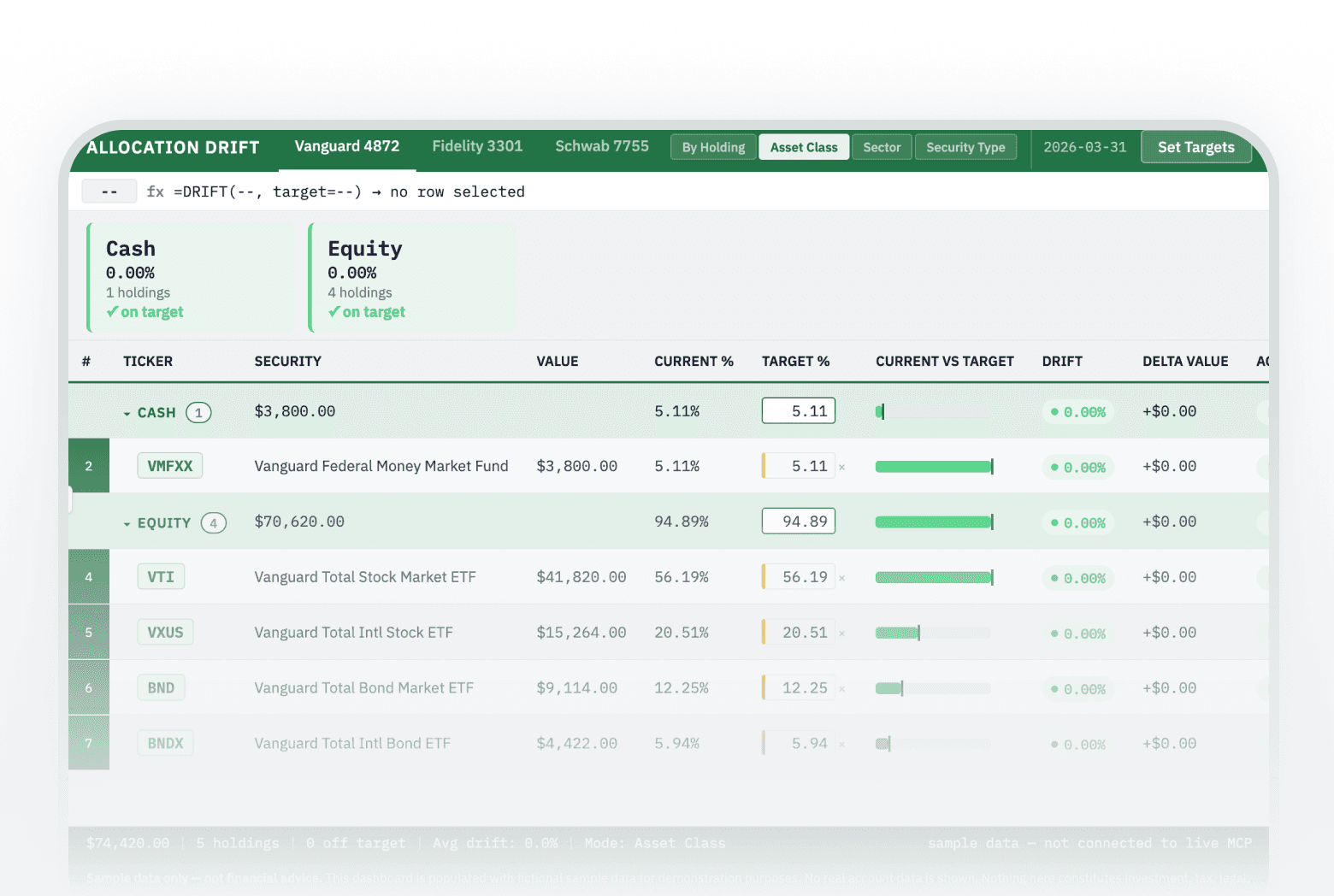

This prompt fetches your holdings across all your investment and retirement accounts and builds an Excel-inspired allocation drift dashboard. You set target allocations at the holding, asset class, sector, or security type level, and the dashboard shows drift, delta in dollars, and BUY/SELL/HOLD recommendations in real time.
how to check if my portfolio has drifted from target allocation
AI tool to calculate rebalancing trades in my portfolio / how to see which holdings are over or under weight
About this prompt
Every portfolio drifts. This prompt builds a live interactive dashboard from your actual holdings, lets you set targets at four levels of detail, and shows exactly what's over-weight, under-weight, and what a rebalance would cost.
Prompt details
> **How to use this prompt:** Copy everything below this line into a new Claude chat > that has the Truthifi MCP connected, then follow the instructions — by doing so you > agree to the [Truthifi Prompt Gallery Terms of Use](https://truthifi-connect.ai/prompt-gallery-terms). --- ``` ━━━━━━━━━━━━━━━━━━━━━━━━━━━━━━━━━━━━━━━━━━━━━━━━━━━━━━━━━━━━ ⚠️ TRUTHIFI PROMPT GALLERY — USE RESPONSIBLY ━━━━━━━━━━━━━━━━━━━━━━━━━━━━━━━━━━━━━━━━━━━━━━━━━━━━━━━━━━━━ This prompt is published in the Truthifi Prompt Gallery and is intended for users who understand how AI prompts work and who take personal responsibility for their use and any outputs produced. • NOT FINANCIAL ADVICE — all AI-generated output is for informational and entertainment purposes only. Nothing produced by this prompt constitutes investment, tax, legal, or financial advice of any kind. • YOUR DATA — portfolio data is retrieved live from your Truthifi account via MCP solely within your active AI session. It is not stored, logged, or transmitted by this prompt beyond what is described in Truthifi's Privacy Policy. • SHARING — outputs may contain real portfolio data rendered as formatted values. Review any generated file carefully before sharing it publicly or with third parties. • MODIFICATIONS — altering this prompt, removing safety language, or repurposing it outside its stated purpose removes Truthifi's intended safeguards. Any such use is entirely at your own risk. • LIABILITY — Truthifi accepts no liability for AI-generated outputs, their accuracy, or any decisions made based on them. By running this prompt you confirm you have read and agree to the Truthifi Prompt Gallery Terms of Use. Full terms: https://truthifi-connect.ai/prompt-gallery-terms ━━━━━━━━━━━━━━━━━━━━━━━━━━━━━━━━━━━━━━━━━━━━━━━━━━━━━━━━━━━━ ``` # Allocation Drift Dashboard **Truthifi MCP Required** | Version: 1.3.7 | Created: 2026-03-31 --- ## GOAL Build a full-page, Excel-inspired allocation drift dashboard as a single self-contained HTML file. The dashboard fetches live account and holdings data from your Truthifi MCP, lets you set per-position target allocations in one of four target-setting modes, and instantly shows how far each position (or group) has drifted from target — with colour-coded alerts, a live formula bar, and one-click BUY/SELL/HOLD action recommendations. --- ## CONTEXT & BACKGROUND Allocation drift is silent but costly: a portfolio left unmonitored can drift far from its intended risk profile within months of a strong market move. Most investors lack a simple, visual way to see exactly which positions are over-weight or under-weight, by how much, and what to do about it. This dashboard surfaces that information instantly, in a format borrowed from the spreadsheet workflows most investors already use, so that a rebalancing decision takes minutes instead of hours. The v1.3.0 dashboard adds a **target-setting mode picker** to the title bar. Users can now choose to set targets at four different levels of granularity — individual holdings, asset class, sector, or security type — and the grid and alert strip automatically group and recalculate accordingly. Group-level targets cascade proportionally down to individual holdings as suggested sub-targets, and users can override any individual holding target directly in the grid. The v1.3.6 dashboard pre-seeds all target maps with the current portfolio % at load time, so every input defaults to the actual current allocation and drift starts at zero everywhere. Users edit from a known baseline rather than from blank fields. --- ## TRUTHIFI MCP DEPENDENCIES | Step | MCP Tool | Purpose | Key Parameters | |------|----------|---------|----------------| | 1 | `get_accounts` | Fetch all investment and retirement accounts | `include: ["accountId","providerName","accNumber","name","type","subType"]` | | 2a | `get_balance_history` | Pre-screen to identify funded accounts (endingBalance > 0) | `dateRange: { from: TODAY, to: TODAY }, accountIds: null` | | 2b | `get_dated_holdings` | Fetch holdings **per funded account** (one call per account) | `dateRange: { from: TODAY, to: TODAY }, include: ["accountId","symbol","securityName","securityType","balance","price","quantity","sectors"], accountIds: [<single accountId>], limit: 200` | | 3 | `get_composition` | Fetch asset-class breakdown for all-accounts view | `arrangeBy: ["TraditionalAssetClasses"], dateRange: { from: TODAY, to: TODAY }, include: ["classificationType","holdings"]` | **Call scoping notes:** - `get_accounts`: filter returned accounts to `type === "Investing"` or `type === "Retirement"` for tab display. Retain `accountId` for all downstream calls. - `get_balance_history`: call with `accountIds: null` to get balance history for all accounts. Filter to accounts where `endingBalance > 0` — these are the **funded accounts** (`FUNDED`). Zero-balance accounts are excluded from all holdings fetches and rendered directly as empty-state in the dashboard without a holdings call. - `get_dated_holdings`: **always called per funded account** using `accountIds: [<single accountId>]` — never `accountIds: null` across multiple accounts simultaneously. A single null-scoped call with a shared `limit` will silently crowd out smaller accounts if one large account has many positions. **Include `"sectors"` in the `include` array** — this field is required for Sector mode grouping. - `limit: 200` is a **per-account ceiling**, not a shared budget across all accounts. - `get_composition`: pass `accountIds: null` for all-accounts view; pass a single `accountId` for per-account composition if needed. > **Requires an active Truthifi MCP connection.** This prompt will not function without it. --- ## USER-CAPTURED DATA REGISTRY This prompt collects no persistent personal data from you before running — all data is retrieved live from your Truthifi account via MCP. Target allocations are set interactively inside the dashboard after it renders, stored in browser memory for the session, and discarded when the tab is closed. **Privacy note:** No account names, balances, tickers, or target percentages are captured by this prompt or transmitted anywhere. All data exists only within the current session. **Data removed:** None — no session-specific data was present in the source prompt. **Data generalized:** None required. --- ## DESIGN SYSTEM ### Color Palette | Role | CSS Variable | Hex Value | |------|-------------|-----------| | **Backgrounds** | | | | Page background | `--color-bg-page` | `#eff1f4` | | Row alternate tint | `--color-bg-row-alt` | `#f8f9fb` | | **Brand / Accent** | | | | Title bar / header | `--color-brand-primary` | `#217346` | | Status bar | `--color-brand-dark` | `#185a33` | | Ticker chip background | `--color-chip-bg` | `#e8f5ee` | | Ticker chip text | `--color-chip-text` | `#185a33` | | Ticker chip border | `--color-chip-border` | `#b7dfc8` | | Column header underline | `--color-header-rule` | `#217346` | | Row number gutter | `--color-gutter-bg` | `#217346` | | Modal header | `--color-modal-header-bg` | `#217346` | | **Group header rows** | | | | Group row background | `--color-group-bg` | `#ddeee5` | | Group row border | `--color-group-border` | `#217346` | | **Semantic / Status -- Over-target (Red)** | | | | Over-target row background | `--color-over-bg` | `#fdf2f1` | | Over-target accent / text | `--color-over-accent` | `#e74c3c` | | **Semantic / Status -- Under-target (Amber)** | | | | Under-target row background | `--color-under-bg` | `#fdf8ee` | | Under-target accent / text | `--color-under-accent` | `#e6a817` | | **Semantic / Status -- On-target (Green)** | | | | On-target row background | `--color-on-bg` | `#e8f5ee` | | On-target accent / text | `--color-on-accent` | `#2ecc71` | | **Semantic / Status -- Buy action (Blue)** | | | | Buy action background | `--color-buy-bg` | `#eef4fd` | | Buy action accent | `--color-buy-accent` | `#1a5fa8` | | **Text** | | | | Primary text | `--color-text-primary` | `#1a1a2e` | | Muted / secondary text | `--color-text-muted` | `#6b7280` | | On-brand text (white) | `--color-text-on-brand` | `#ffffff` | | **Utility** | | | | White surface (modal box, etc.) | `--color-bg-white` | `#ffffff` | | Subtle border / divider | `--color-border-subtle` | `#e5e7eb` | > **Chart Series:** Not applicable — no charting library is used in this prompt. All visual indicators are CSS-driven bars and badges. > > **Conditional Logic:** Not applicable as a separate group — status-driven conditional coloring is fully covered by the Semantic / Status group above (Over-target / Under-target / On-target / Buy action). ### Typography | Role | Font Family | Source / CDN | Weights Loaded | |------|------------|--------------|----------------| | Labels, names, body | IBM Plex Sans | Google Fonts | 400, 500, 600 | | Numbers, tickers, formula bar, status bar | IBM Plex Mono | Google Fonts | 400, 500, 600 | **Load URL (both fonts, single request):** ``` https://fonts.googleapis.com/css2?family=IBM+Plex+Mono:wght@400;500;600&family=IBM+Plex+Sans:wght@400;500;600&display=swap ``` **Type Scale:** | Element | Size | Weight | Font Family | Semantic Level | Notes | |---------|------|--------|-------------|----------------|-------| | Title bar heading | 15px | 600 | IBM Plex Sans | `<h1>`-equivalent | Uppercase label | | Tab labels | 13px | 500 | IBM Plex Sans | `<nav>` label | | | Mode picker buttons | 11px | 500 | IBM Plex Sans | `<nav>` label | Active state: 600, inverted | | Formula bar cell ref | 13px | 500 | IBM Plex Mono | UI chrome | | | Formula bar expression | 13px | 400 | IBM Plex Mono | UI chrome | | | Alert card ticker | 18px | 600 | IBM Plex Mono | `<h3>`-equivalent | Large, prominent | | Alert card stat label | 9px | 600 | IBM Plex Sans | UI chrome | Uppercase, Current/Target/Drift labels | | Alert card stat value | 12px | 500 | IBM Plex Mono | Data display | Drift value colored by status | | Alert card security name | 12px | 400 | IBM Plex Sans | `<p>`-equivalent | | | Alert card action line | 11px | 700 | IBM Plex Sans | `<strong>`-equivalent | Bold | | Grid column header | 12px | 600 | IBM Plex Sans | `<th>`-equivalent | Uppercase | | Grid body -- Ticker | 13px | 600 | IBM Plex Mono | `<td>` data | | | Grid body -- Security name | 13px | 400 | IBM Plex Sans | `<td>` label | | | Grid body -- Numbers | 13px | 400 | IBM Plex Mono | `<td>` data | | | Grid body -- Action pill | 12px | 600 | IBM Plex Sans | `<td>` label | | | Group row label | 12px | 600 | IBM Plex Sans | `<td>` data | Uppercase, brand color | | Group badge (holding count) | 11px | 500 | IBM Plex Sans | `<td>` label | Muted | | Status bar | 12px | 400 | IBM Plex Mono | UI chrome | | ### Spacing & Layout | Property | Value | |---------|-------| | App shell max-width | 1400px | | App shell centering | `margin: 0 auto` | | App shell padding | 20px top/bottom, 24px left/right | | Row height (minimum) | 48px | | Table zone | `flex: 1; overflow: auto` | | Page layout | `body { height: 100vh; overflow: hidden; display: flex; flex-direction: column; }` | | Alert strip gap | 12px | | Alert strip max-height | `128px` (cards + padding); `overflow-y: hidden` — prevents tall cards from pushing the grid upward | | Alert card border-radius | 6px | | Alert card left border | 3px solid (status color) | **No gradients. No drop shadows. No decorative elements. Every visible element is functional.** ### Component Styles **Ticker Chip** ```css .ticker-chip { background: var(--color-chip-bg); color: var(--color-chip-text); border: 1px solid var(--color-chip-border); font-family: 'IBM Plex Mono', monospace; font-size: 13px; font-weight: 600; padding: 2px 8px; border-radius: 4px; display: inline-block; } ``` **Drift Badge** ```css .drift-badge { display: inline-flex; align-items: center; gap: 5px; font-family: 'IBM Plex Mono', monospace; font-size: 12px; font-weight: 500; padding: 3px 8px; border-radius: 12px; } .drift-badge::before { /* coloured dot */ content: ''; width: 6px; height: 6px; border-radius: 50%; background: currentColor; } .drift-badge.over { background: var(--color-over-bg); color: var(--color-over-accent); } .drift-badge.under { background: var(--color-under-bg); color: var(--color-under-accent); } .drift-badge.on { background: var(--color-on-bg); color: var(--color-on-accent); } ``` **Action Pill** ```css .action-pill { font-family: 'IBM Plex Sans', sans-serif; font-size: 12px; font-weight: 600; padding: 3px 10px; border-radius: 12px; white-space: nowrap; } .action-pill.sell { background: var(--color-over-bg); color: var(--color-over-accent); } .action-pill.buy { background: var(--color-buy-bg); color: var(--color-buy-accent); } .action-pill.hold { background: var(--color-on-bg); color: var(--color-on-accent); } ``` **Target Input (editable cell)** Target inputs must use `type="text" inputmode="decimal"` — **not** `type="number"`. Using `type="number"` renders browser spinner arrows that block direct keyboard entry and make the field feel like a stepper rather than a text box. `type="text"` with `inputmode="decimal"` preserves a numeric soft keyboard on mobile while allowing free direct typing on desktop. ```html <input type="text" inputmode="decimal" class="target-input" placeholder="0.00"> ``` Validate numeric input in JS on the `input` event. **Only rewrite `inp.value` when the content has actually changed** — unconditional reassignment resets the cursor position on every keystroke, which prevents multi-digit entry in sandboxed environments: ```js // Attached to every .target-input element function sanitizeNumericInput(inp) { // Strip anything that is not a digit or a single decimal point const raw = inp.value.replace(/[^0-9.]/g, ''); // Prevent more than one decimal point const parts = raw.split('.'); const cleaned = parts.length > 2 ? parts[0] + '.' + parts.slice(1).join('') : raw; // Only write back if content changed — preserves cursor position during normal digit typing if (cleaned !== inp.value) inp.value = cleaned; } ``` ```css .target-input { width: 64px; font-family: 'IBM Plex Mono', monospace; font-size: 13px; border: 1px solid var(--color-border-subtle); border-radius: 3px; padding: 2px 6px; text-align: right; background: transparent; color: var(--color-text-primary); } .target-input:focus { outline: 2px solid var(--color-brand-primary); outline-offset: 1px; } /* Group-row inputs sit on --color-group-bg (green-tinted). Override to white background + group-border so the input and its typed value are clearly legible against the row. */ tr.group-row .target-input { background: var(--color-bg-white); border-color: var(--color-group-border); } tr.group-row .target-input:focus { outline-color: var(--color-brand-dark); } /* Manually overridden holding sub-row inputs: amber left border signals a user-set value that is not driven by the cascade. The x clear button sits immediately to the right. */ .target-input.overridden { border-left: 3px solid var(--color-under-accent); padding-left: 4px; } .target-clear-btn { font-family: 'IBM Plex Mono', monospace; font-size: 11px; color: var(--color-text-muted); background: none; border: none; cursor: pointer; padding: 0 2px; line-height: 1; opacity: 0.6; } .target-clear-btn:hover { opacity: 1; color: var(--color-under-accent); } /* Target input td: use text cursor and stop click events propagating to the row handler */ .detail-grid tbody tr.holding-row td[data-input-cell] { cursor: text; } ``` **Input td interaction guard** — the target input td must carry `data-input-cell="1"` and stop all click/mousedown events from bubbling to the `tr` row handler, which would otherwise intercept focus: ```js // Applied when building each sub-row target td stTgtTd.dataset.inputCell = '1'; stTgtTd.addEventListener('mousedown', function(e) { e.stopPropagation(); }); stTgtTd.addEventListener('click', function(e) { e.stopPropagation(); sInp.focus(); }); sInp.addEventListener('mousedown', function(e) { e.stopPropagation(); }); sInp.addEventListener('click', function(e) { e.stopPropagation(); }); ``` The `tr` click handler must also guard against clicks landing on the td itself (not just on the input element): ```js tr.addEventListener('click', function(e) { if (e.target.tagName === 'INPUT' || e.target.tagName === 'BUTTON') return; if (e.target.closest && e.target.closest('td') && e.target.closest('td').dataset.inputCell) return; updateFormulaBar(/* ... */); }); ``` **Mode Picker** ```css .mode-picker { display: flex; align-items: center; gap: 2px; border-right: 1px solid rgba(255,255,255,0.2); padding: 8px 12px 8px 4px; margin-right: 10px; flex-shrink: 0; } .mode-btn { background: rgba(255,255,255,0.1); border: 1px solid rgba(255,255,255,0.2); color: rgba(255,255,255,0.7); font-family: 'IBM Plex Sans', sans-serif; font-size: 11px; font-weight: 500; padding: 3px 9px; border-radius: 3px; cursor: pointer; white-space: nowrap; transition: background 0.12s, color 0.12s; } .mode-btn:hover { background: rgba(255,255,255,0.2); color: var(--color-text-on-brand); } .mode-btn.active { background: rgba(255,255,255,0.9); color: var(--color-brand-dark); font-weight: 600; } ``` **Group Row (grid)** ```css table.detail-grid tbody tr.group-row td { background: var(--color-group-bg) !important; border-top: 1px solid var(--color-group-border); } table.detail-grid tbody tr.group-row:hover td { filter: brightness(0.97); cursor: pointer; } tr.group-row td.row-num { background: var(--color-brand-dark) !important; } .group-label { font-family: 'IBM Plex Sans', sans-serif; font-size: 12px; font-weight: 600; color: var(--color-brand-dark); text-transform: uppercase; letter-spacing: 0.04em; } .group-caret { display: inline-block; margin-right: 6px; transition: transform 0.15s; font-size: 10px; color: var(--color-brand-dark); } .group-row.group-collapsed .group-caret { transform: rotate(-90deg); } .group-badge { font-family: 'IBM Plex Sans', sans-serif; font-size: 11px; font-weight: 500; color: var(--color-text-muted); background: rgba(255,255,255,0.6); border: 1px solid var(--color-group-border); border-radius: 10px; padding: 1px 7px; margin-left: 8px; } /* Collapse is driven exclusively by JS — see Code Quality item 12. JS sets style.display on holding-row elements matched by data-group-key. Do NOT use CSS sibling selectors for collapse; they cannot be scoped per group. */ ``` **"Set Targets" Button** ```css .btn-set-targets { background: rgba(255,255,255,0.15); color: var(--color-text-on-brand); border: 1px solid rgba(255,255,255,0.4); font-family: 'IBM Plex Sans', sans-serif; font-size: 13px; font-weight: 500; padding: 5px 14px; border-radius: 4px; cursor: pointer; } .btn-set-targets:hover { background: rgba(255,255,255,0.25); } ``` **Modal** ```css .modal-overlay { position: fixed; inset: 0; background: rgba(0,0,0,0.45); display: none; align-items: center; justify-content: center; z-index: 100; } .modal-overlay.open { display: flex; } .modal-box { background: var(--color-bg-white); border-radius: 8px; width: min(520px, 90vw); max-height: 80vh; display: flex; flex-direction: column; overflow: hidden; } .modal-header { background: var(--color-modal-header-bg); color: var(--color-text-on-brand); padding: 16px 20px; font-family: 'IBM Plex Sans', sans-serif; font-size: 15px; font-weight: 600; display: flex; align-items: center; gap: 10px; } .modal-mode-pill { font-size: 11px; font-weight: 500; background: rgba(255,255,255,0.25); border-radius: 10px; padding: 2px 8px; } .modal-body { padding: 14px 20px; overflow-y: auto; flex: 1; } .modal-footer { padding: 10px 20px; border-top: 1px solid var(--color-border-subtle); flex-shrink: 0; } .modal-group-header { display: flex; align-items: baseline; justify-content: space-between; font-family: 'IBM Plex Sans', sans-serif; font-size: 12px; font-weight: 600; padding: 10px 0 4px; border-bottom: 1px solid var(--color-group-border); color: var(--color-brand-dark); text-transform: uppercase; letter-spacing: 0.04em; } .modal-group-header span { font-weight: 400; color: var(--color-text-muted); font-size: 11px; text-transform: none; letter-spacing: 0; } .modal-pos-row { display: flex; align-items: center; gap: 8px; padding: 7px 0; border-bottom: 1px solid var(--color-border-subtle); } .modal-pos-row:last-child { border-bottom: none; } .modal-pos-row.indent { padding-left: 16px; } .modal-pos-info { flex: 1; display: flex; align-items: center; gap: 6px; overflow: hidden; min-width: 0; } .modal-pos-name { font-size: 11px; color: var(--color-text-muted); white-space: nowrap; overflow: hidden; text-overflow: ellipsis; } .modal-pos-current { font-family: 'IBM Plex Mono', monospace; font-size: 11px; color: var(--color-text-muted); width: 52px; text-align: right; flex-shrink: 0; } .modal-cascade-note { font-family: 'IBM Plex Sans', sans-serif; font-size: 11px; color: var(--color-text-muted); background: var(--color-bg-page); border-left: 3px solid var(--color-brand-primary); padding: 8px 10px; border-radius: 3px; margin-bottom: 10px; } ``` **Progress Bar (modal sum indicator)** ```css .sum-bar-track { height: 8px; border-radius: 4px; background: var(--color-border-subtle); overflow: hidden; margin-bottom: 6px; } .sum-bar-fill { height: 100%; border-radius: 4px; transition: width 0.15s; } .sum-bar-fill.under { background: var(--color-under-accent); } .sum-bar-fill.over { background: var(--color-over-accent); } .sum-bar-fill.exact { background: var(--color-on-accent); } ``` **Current vs Target Bar (grid column)** ```css .drift-bar-track { height: 10px; border-radius: 3px; background: var(--color-border-subtle); position: relative; min-width: 80px; } .drift-bar-fill { height: 100%; border-radius: 3px; position: absolute; left: 0; top: 0; } .drift-bar-tick { /* marks the target % */ position: absolute; top: -2px; bottom: -2px; width: 2px; background: var(--color-brand-dark); } ``` **Alert Card (drift alert strip)** ```css .alert-card { display: flex; flex-direction: column; justify-content: space-between; min-height: 86px; min-width: 196px; padding: 10px 14px; border-radius: 6px; border-left: 3px solid; /* color set by status class */ flex-shrink: 0; } .alert-card.over { background: var(--color-over-bg); border-color: var(--color-over-accent); } .alert-card.under { background: var(--color-under-bg); border-color: var(--color-under-accent); } .alert-card.on { background: var(--color-on-bg); border-color: var(--color-on-accent); } .alert-card.no-target { background: var(--color-bg-row-alt); border-color: var(--color-border-subtle); } .alert-card__ticker { font-family: 'IBM Plex Mono', monospace; font-size: 16px; font-weight: 600; } .alert-card__name { font-family: 'IBM Plex Sans', sans-serif; font-size: 11px; color: var(--color-text-muted); margin-bottom: 4px; } /* Three-stat row: Current % / Target % / Drift */ .alert-card__stats { display: flex; gap: 10px; margin: 3px 0; } .alert-card__stat { display: flex; flex-direction: column; } .alert-card__stat-label { font-family: 'IBM Plex Sans', sans-serif; font-size: 9px; font-weight: 600; text-transform: uppercase; letter-spacing: 0.04em; color: var(--color-text-muted); } .alert-card__stat-value { font-family: 'IBM Plex Mono', monospace; font-size: 12px; font-weight: 500; } .alert-card__stat-value.drift-positive { color: var(--color-over-accent); } .alert-card__stat-value.drift-negative { color: var(--color-under-accent); } .alert-card__stat-value.drift-zero { color: var(--color-on-accent); } .alert-card__action { font-family: 'IBM Plex Sans', sans-serif; font-size: 11px; font-weight: 700; } ``` **Detail Grid Table** ```css .detail-grid { flex: 1; overflow: auto; width: 100%; border-collapse: collapse; font-family: 'IBM Plex Sans', sans-serif; } .detail-grid th { position: sticky; top: 0; background: var(--color-bg-page); border-bottom: 2px solid var(--color-header-rule); font-size: 12px; font-weight: 600; text-transform: uppercase; padding: 0 12px; height: 36px; white-space: nowrap; z-index: 10; } .detail-grid td { padding: 0 12px; height: 48px; vertical-align: middle; border-bottom: 1px solid var(--color-border-subtle); } .detail-grid tr:nth-child(odd) td { background: var(--color-bg-page); } .detail-grid tr:nth-child(even) td { background: var(--color-bg-row-alt); } .detail-grid td.row-num { background: var(--color-gutter-bg); color: var(--color-text-on-brand); font-family: 'IBM Plex Mono', monospace; font-size: 11px; text-align: center; width: 36px; min-width: 36px; } ``` Load in this exact order: ```html <link rel="preconnect" href="https://fonts.googleapis.com"> <link rel="preconnect" href="https://fonts.gstatic.com" crossorigin> <link href="https://fonts.googleapis.com/css2?family=IBM+Plex+Mono:wght@400;500;600&family=IBM+Plex+Sans:wght@400;500;600&display=swap" rel="stylesheet"> ``` No JavaScript libraries are required. All logic uses vanilla JS. > **Note on font versioning:** Google Fonts URLs are not version-pinnable — Google controls font delivery and may update typefaces over time. This is an acceptable infrastructure dependency for this use case. If long-term pixel-exact reproducibility is required, self-host the font files instead. ### External References | Resource | URL | Load Order | Notes | |----------|-----|------------|-------| | Google Fonts preconnect | `https://fonts.googleapis.com` | 1 | `<link rel="preconnect">` | | Google Fonts preconnect (static) | `https://fonts.gstatic.com` | 2 | `crossorigin` attribute required | | IBM Plex Sans + IBM Plex Mono | `https://fonts.googleapis.com/css2?family=IBM+Plex+Mono:wght@400;500;600&family=IBM+Plex+Sans:wght@400;500;600&display=swap` | 3 | `<link rel="stylesheet">` | **No other external scripts or stylesheets are permitted.** THE PROMPT instructs Claude to load these three `<link>` tags in the exact order listed above, before any other `<head>` content. Do not reorder, combine, or replace them with a different CDN. --- ## TARGET-SETTING MODES The dashboard supports four target-setting modes, selectable via the mode picker in the title bar. Each mode changes how the grid is grouped, how targets are entered, and how drift is calculated. ### Mode Definitions | Mode Key | Label | Group Unit | Target Input Level | Group Key | |----------|-------|-----------|-------------------|-----------| | `holding` | By Holding | Individual position | Per ticker/symbol | `position.symbol` or `position.securityName` | | `assetClass` | Asset Class | Broad asset class | Per asset class | Derived from `securityType` via `SECURITY_TYPE_TO_ASSET_CLASS` map | | `sector` | Sector | Dominant sector | Per sector | Dominant key in `position.sectors` by weight | | `securityType` | Security Type | Security type enum | Per security type | Pretty-printed `position.securityType` | ### Asset Class Mapping When `activeMode === 'assetClass'`, map `position.securityType` to an asset class label using this constant: ```js const SECURITY_TYPE_TO_ASSET_CLASS = { equity: 'Equity', etf: 'Equity', mutual_fund: 'Equity', bond: 'Fixed Income', treasury: 'Fixed Income', cd: 'Fixed Income', money_market_fund:'Cash', currency: 'Cash', sweep_account: 'Cash', derivative: 'Derivatives', option: 'Derivatives', future: 'Derivatives', real_estate: 'Real Estate', remic: 'Real Estate' }; // Fallback: 'Other' ``` ### Sector Mode When `activeMode === 'sector'`, the group key for a position is the **dominant sector by weight** — the key in `position.sectors` with the highest value. If `position.sectors` is null, empty, or has no keys, the group key is `'Unclassified'`. The `sectors` field is a map of `{ sectorName: weight }` where weights sum to approximately 1. > **Scale note:** The dominant-sector selection logic (`pos.sectors[k] > maxV`) compares relative weight values and is scale-invariant — it returns the correct dominant key regardless of whether weights sum to exactly 1.0 or differ due to a data anomaly. No normalization is needed before applying `getGroupKey`. ### getGroupKey Function Define this function in JS to return the group key for a position given the active mode: ```js function getGroupKey(pos) { if (activeMode === 'assetClass') return SECURITY_TYPE_TO_ASSET_CLASS[pos.securityType] || 'Other'; if (activeMode === 'sector') { if (!pos.sectors || Object.keys(pos.sectors).length === 0) return 'Unclassified'; let maxK = 'Unknown', maxV = 0; Object.keys(pos.sectors).forEach(function(k) { if (pos.sectors[k] > maxV) { maxV = pos.sectors[k]; maxK = k; } }); return maxK; } if (activeMode === 'securityType') return fmtSecType(pos.securityType); return pos.symbol || pos.securityName || '??'; // holding mode } ``` ### buildGroups Function Used in grouped modes to aggregate holdings into groups for the grid and modal: ```js // Returns array of { groupKey, holdings, groupBalance, groupPct } function buildGroups(holdings, accountTotal) { const map = {}; holdings.forEach(function(pos) { const key = getGroupKey(pos); if (!map[key]) map[key] = { groupKey: key, holdings: [], groupBalance: 0 }; map[key].holdings.push(pos); map[key].groupBalance += (pos.balance || 0); }); return Object.keys(map).sort().map(function(key) { const g = map[key]; g.groupPct = accountTotal > 0 ? (g.groupBalance / accountTotal) * 100 : 0; return g; }); } ``` ### Target Storage Structure Targets are stored per-account and per-mode, keyed by group key: ```js // TARGETS map: { [accountId]: { [mode]: { [groupKey]: targetPct } } } // In 'holding' mode, groupKey = position.symbol. // In grouped modes, groupKey = group label (assetClass, sector, securityType). // Manual overrides from holding sub-rows in grouped modes are also stored in // TARGETS[accountId]['holding'][symKey] -- the same store used by By Holding mode. const TARGETS = {}; function getTargetMap(accountId, mode) { if (!TARGETS[accountId]) return null; if (!TARGETS[accountId][mode]) return null; return TARGETS[accountId][mode]; } function setTargetMap(accountId, mode, map) { if (!TARGETS[accountId]) TARGETS[accountId] = {}; TARGETS[accountId][mode] = map; } ``` ### Default Targets: Pre-seeded to Current Allocation At initialization, **before the first render**, pre-seed all target maps with each account's current portfolio % for all four modes. This means every input opens showing the actual current allocation, drift starts at zero everywhere, and the bar and badges are fully populated from the first render. The user edits from a known baseline rather than from blank fields. ```js // Called once after ALL_HOLDINGS is populated, before renderAll() function seedDefaultTargets() { const MODES = ['holding', 'assetClass', 'sector', 'securityType']; ACC.forEach(function(acc) { const holdings = holdingsForAccount(acc.accountId); if (!holdings.length) return; const total = holdings.reduce(function(s, h) { return s + (h.balance || 0); }, 0); if (total <= 0) return; MODES.forEach(function(mode) { const savedMode = activeMode; activeMode = mode; // temporarily set so getGroupKey / buildGroups use correct logic const map = {}; if (mode === 'holding') { holdings.forEach(function(pos) { const key = pos.symbol || pos.securityName || '??'; map[key] = (pos.balance || 0) / total * 100; }); } else { buildGroups(holdings, total).forEach(function(g) { map[g.groupKey] = g.groupPct; }); } setTargetMap(acc.accountId, mode, map); activeMode = savedMode; }); }); } ``` Call `seedDefaultTargets()` immediately before `renderAll()` in the initialization block. ### Cascade: Group Targets to Individual Holdings In grouped modes, once a group target is set, the cascade calculates a **suggested target** for each holding proportionally — but the user can override any holding's target directly by typing into its sub-row input. Overrides are stored in `TARGETS[accountId]['holding'][symbol]` (the same store used by By Holding mode), so they persist when the user switches modes. **Cascade suggestion function** — returns the proportional suggested target, or `null` if no group target is set: ```js // Returns a suggested target % for a holding within its group, or null if no group target set. // Used only when the holding has no manual override in TARGETS[accountId]['holding'][symbol]. function getSuggestedHoldingTarget(pos, accountId, holdings, accountTotal) { const groupTargetMap = getTargetMap(accountId, activeMode); if (!groupTargetMap || activeMode === 'holding') return null; const groupKey = getGroupKey(pos); const groupTargetPct = groupTargetMap[groupKey]; if (groupTargetPct === undefined) return null; const groupHoldings = holdings.filter(function(h) { return getGroupKey(h) === groupKey; }); const groupTotal = groupHoldings.reduce(function(s, h) { return s + (h.balance || 0); }, 0); if (groupTotal <= 0) return null; return (groupTargetPct * (pos.balance || 0)) / groupTotal; } ``` **Effective target resolution** — when computing drift for a holding sub-row in grouped mode, resolve the target in this priority order: ```js // Returns the effective target % for a holding sub-row in grouped mode. // Priority: (1) manual override in holding-mode store, (2) cascade suggestion, (3) null. function getEffectiveHoldingTarget(pos, accountId, holdings, accountTotal) { const holdingMap = getTargetMap(accountId, 'holding'); const symKey = pos.symbol || pos.securityName || ''; if (holdingMap && holdingMap[symKey] !== undefined) { return Number(holdingMap[symKey]); // manual override wins } return getSuggestedHoldingTarget(pos, accountId, holdings, accountTotal); // cascade fallback } ``` **Override state:** A holding sub-row input is considered **manually overridden** when `TARGETS[accountId]['holding'][symKey]` has a value. Overridden inputs display the `overridden` class (amber left border) and a small clear button (`x`) immediately to the right. Clicking `x` deletes the override, removes `overridden` class, restores the cascade suggestion as placeholder, and re-runs drift. **Cascade update rule:** When a group target changes (via the inline group input or the modal), iterate all holding sub-rows in that group. For each sub-row that is **not** manually overridden, update its input `placeholder` to the new cascade-suggested value. Do **not** overwrite inputs that have a manual override. ### In-Place Row Update When a target input changes via live keystroke (in holding mode or grouped mode sub-rows), **do not call `renderGrid()`** — that would destroy the DOM and remove focus from the input. Instead, surgically update only the visual columns that depend on the target value (bar, badge, delta, action) using an in-place helper: ```js // Clears a td's children without innerHTML function clearCell(td) { while (td.firstChild) td.removeChild(td.firstChild); } // Updates cols 6-9 (bar, badge, delta, action) of a single <tr> in-place. // rowEl: the <tr>; curPct/tgt/total/maxPct: numbers for recalculation. function updateRowCellsInPlace(rowEl, curPct, tgt, total, maxPct) { const dc = calcDrift(curPct, tgt, total); const cls = tgt !== null && !isNaN(tgt) ? driftClass(dc.drift) : 'on'; const cells = rowEl.querySelectorAll('td'); // Col index 6 = bar, 7 = drift badge, 8 = delta, 9 = action if (cells[6]) { clearCell(cells[6]); cells[6].appendChild(buildDriftBar(curPct, tgt, maxPct, cls)); } if (cells[7]) { clearCell(cells[7]); cells[7].appendChild(buildDriftBadge(tgt !== null && !isNaN(tgt) ? dc.drift : null)); } if (cells[8]) { cells[8].textContent = tgt !== null && !isNaN(tgt) ? fmtDelta(dc.deltaDollars) : '--'; } if (cells[9]) { clearCell(cells[9]); cells[9].appendChild(buildActionPill(tgt !== null && !isNaN(tgt) ? dc.action : null, dc.actionAmount)); } } ``` Call `updateRowCellsInPlace` from `onHoldingTargetChange` and `onSubRowTargetChange` after each keystroke, then call `renderAlertStrip()` and `renderStatusBar()` to keep the strip and status bar in sync. Never call `renderGrid()` from these handlers. ### Mode State ```js let activeMode = 'holding'; // holding | assetClass | sector | securityType const MODE_LABELS = { holding: 'By Holding', assetClass: 'Asset Class', sector: 'Sector', securityType: 'Security Type' }; ``` Switching mode clears `collapsedGroups` and triggers a full re-render: ```js // On mode-btn click: activeMode = btn.getAttribute('data-mode'); collapsedGroups.clear(); renderAll(); ``` --- ## VISUALIZATION SPEC ### Library Inventory | Visualization | Library | Version / CDN | Notes | |--------------|---------|---------------|-------| | Current vs Target bar | Vanilla CSS/HTML | N/A | Inline `<div>` with positioned tick mark | | Alert card drift display | Vanilla CSS/HTML | N/A | Color-coded card layout | | Modal sum progress bar | Vanilla CSS/HTML | N/A | Animated fill driven by JS | No external charting library is used. All visual indicators are CSS-driven for zero dependency overhead. ### Visualization Specifications **Current vs Target Bar (grid column)** - Track: `--color-bg-row-alt` fill, full column width - Fill: colored by drift status using status accent colors (`--color-over-accent`, `--color-under-accent`, `--color-on-accent`) - Fill width: `(currentPct / maxPct) * 100%` clamped to `[0, 100]` where `maxPct` = max current % in account (or group in grouped modes) - Tick mark: a 2px dark-green vertical line positioned at `(targetPct / maxPct) * 100%` clamped to `[0, 100]` - Guard: if `maxPct` is `0` or `null`, render an empty grey track with no fill - **The bar must update in real time as the user types** — use `updateRowCellsInPlace` on every `input` event; do not wait for a Save action. **Alert Card (drift alert strip)** In `holding` mode: one card per position, sorted by abs(drift) descending. In grouped modes: one card per **group**, sorted by abs(drift) descending. The card ticker shows the group label (e.g. "Equity"), and the name line shows the holding count (e.g. "4 holdings"). Drift is calculated at the group level. - Card height: auto; minimum 86px - Left border: 3px solid status accent color - Background: status background color - Ticker/label: IBM Plex Mono 16px/600 (top line) - Subtitle: IBM Plex Sans 11px muted (security name or holding count) - **Three-stat row**: three labeled micro-stats side by side — Current % | Target % | Drift. Each stat has a 9px all-caps label and a 12px IBM Plex Mono value. The Drift value is colored red/amber/green by drift status. This row provides full context so a bare 0.00% is never ambiguous — the reader immediately sees the current allocation, what the target is, and what the gap is. - `buildAlertCard` signature: `(ticker, subtitle, curPct, tgt, drift, action, actionAmount, rowKey)` — `curPct` and `tgt` are required to render the stat row. - Action line (bold, 11px): `"▼ SELL $X,XXX"` / `"▲ BUY $X,XXX"` / `"✓ on target"` (use Unicode: `▼` `▲` `✓`) - Clicking any card: highlights the matching grid row by applying a 1px ring outline in the status accent color for 1.5 seconds, then removes **Modal Sum Progress Bar** - Amber fill when sum < 100%; red fill when sum > 100%; green fill + checkmark pill when sum === 100% - Fill width: `Math.min(sum / 100, 1) * 100%` - Pill label: `"X.X% allocated"` or `"100% -- ready to save"` - Save button: `disabled` unless sum equals exactly `100` (within `Math.abs(sum - 100) < 0.01` tolerance) ### Interaction & Animation Inventory | Interaction | Element | Behavior | Implementation | |------------|---------|----------|----------------| | Tab switch | Account tab | Switches active account data in grid and alert strip; clears collapsedGroups | JS class toggle + data re-render | | Mode switch | Mode picker button | Switches `activeMode`; clears `collapsedGroups`; re-renders all | `activeMode = mode; collapsedGroups.clear(); renderAll()` | | Click alert card | Drift card | Highlights matching grid row | `scrollIntoView` + temporary CSS ring, removed after 1500ms | | Click grid row | Table row (holding-row) | Updates formula bar pseudo-formula | Read row data, update formula bar `textContent` | | Click group row | Table row (group-row) | Toggles collapse of holding sub-rows | Toggle `group-collapsed` class; `collapsedGroups.add/delete`; JS sets `style.display` on sub-rows | | Edit Target % | Target input (holding mode) | Live updates bar, badge, delta, action for that row; updates alert strip and status bar | `input` event -> `sanitizeNumericInput` -> `updateRowCellsInPlace` + `renderAlertStrip` + `renderStatusBar` | | Edit Group Target % | Group target input (grouped modes, inline in grid) | Live recalculates all holding sub-rows in the group; updates cascade placeholders for non-overridden sub-rows | `input` event + full `renderGrid()` | | Edit holding sub-row Target % | Holding sub-row target input (grouped modes) | Stores value in `TARGETS[accountId]['holding'][symKey]`; applies `overridden` class + shows clear button; updates bar/badge/delta/action in-place | `input` event -> `sanitizeNumericInput` -> `updateRowCellsInPlace` + `renderAlertStrip` + `renderStatusBar` | | Clear holding override | `x` clear button on overridden sub-row | Deletes `TARGETS[accountId]['holding'][symKey]`; removes `overridden` class; restores cascade placeholder; updates cells in-place | `click` event on `.target-clear-btn` | | Open Set Targets | Button | Opens modal for active account + active mode | `display: flex` on modal overlay | | Close modal | Overlay click / Cancel | Closes modal without saving | `display: none` on overlay | | Save targets | Save button | Writes targets to per-account, per-mode map; closes modal; triggers full recalculate | Disabled unless sum exactly 100 | | Equal Weight | Quick-fill button | Sets all inputs to `(100 / N).toFixed(2)` | Recalculates sum bar immediately | | Match Current | Quick-fill button | Copies current `%` to each target input | Recalculates sum bar immediately | | Clear All | Quick-fill button | Sets all target inputs to `""` | Sum bar goes to 0 / amber state | | Window resize | `window` resize event | Re-renders grid to recompute JS-driven bar widths | `window.addEventListener('resize', renderGrid)` | --- ## CONFIGURATION OPTIONS This prompt runs with fixed logic. The following behavioral parameters are hardcoded and intentional: | Parameter | Value | Rationale | |-----------|-------|-----------| | Drift threshold for action | +/- 2% | Standard rebalancing band | | Action when drift > +2% | SELL delta dollars | Classical rebalancing direction | | Action when drift < -2% | BUY delta dollars | Classical rebalancing direction | | Action when abs(drift) <= 2% | HOLD | Within tolerance | | Alert sort order | abs(drift) descending | Surfaces largest deviations first | | Holdings limit per call | 200 | Covers most retail portfolios | | Holdings date range | TODAY to TODAY | Real-time snapshot only | | Default mode | `holding` | Granular view by default | | Default targets | Current allocation % | Zero drift on load; user edits from baseline | To change the drift threshold, modify `DRIFT_THRESHOLD_PCT` at the top of the script block in the generated file. --- ## THE PROMPT You are building a full-page allocation drift dashboard as a single, self-contained HTML file. All CSS and JS are inline. Follow every step below exactly. --- ### STEP 0 -- TERMS ACKNOWLEDGEMENT Before doing anything else, display this message verbatim and wait for the user to respond: > "Hi! Before we get started -- this prompt is part of the Truthifi Prompt Gallery. > By continuing, you confirm you have read and agree to the Truthifi Prompt Gallery Terms of Use (https://truthifi-connect.ai/prompt-gallery-terms) -- including that outputs are AI-generated, not financial advice, and that Truthifi accepts no liability for decisions made based on them. > Type **agree** or **yes** to continue, or **terms** to see the key points." **Handling:** - **Affirmative** (agree / yes / ok / sure / any response that unambiguously expresses consent): Acknowledge briefly ("Great -- let's build your dashboard."), then proceed immediately to STEP 1. - **"terms"**: Display the five key-points summary below, then re-ask for confirmation before proceeding. - Outputs are AI-generated and non-deterministic -- results may vary between sessions - Nothing produced is financial advice -- consult a qualified professional before any decisions - Your portfolio data is retrieved live via MCP for this session only -- not stored or transmitted - If you modify this prompt or share its outputs, that is your responsibility - Full terms: https://truthifi-connect.ai/prompt-gallery-terms - **Decline / no**: Respond politely, direct to the terms URL, and STOP. Do not proceed. - **Ambiguous or non-affirmative** (e.g. "start", "proceed", "continue", "just do it", "skip this", or any response that does not clearly express consent): Re-present the acknowledgement. Do not treat these as consent. - **User ignores Step 0 and asks to proceed**: Re-present the acknowledgement. Do not skip it. --- ### STEP 1 -- FETCH DATA Connect to the Truthifi MCP and make the following calls in order. Do not proceed to STEP 2 until all calls have returned data. **Call A -- Accounts** ``` get_accounts include: ["accountId", "providerName", "accNumber", "name", "type", "subType"] ``` Filter the results to accounts where `type` is `"Investing"` or `"Retirement"`. These become the tabs in the dashboard. Store the full filtered list as `ACC`. > **Narration format rule (applies to all steps from here on):** Whenever you refer to an account in your progress narration — listing funded accounts, reporting fetch results, surfacing warnings, or describing any intermediate step — always use the human-readable label `[providerName] ****[last 4 of accNumber]` (e.g. "Fidelity IRA ****5370"). Never display a raw `accountId` string (whether numeric like `28022151` or alphanumeric like `bpVma3zVNBu3POBwqJE1cryPA7a6xLCPeO0e7`) in any user-facing narration, list, warning, or confirmation message. Raw account IDs are internal identifiers and are meaningless — and potentially sensitive — to the user. **Call A2 -- Balance pre-screen (identify funded accounts)** ``` get_balance_history dateRange: { from: <today's ISO date YYYY-MM-DD>, to: <today's ISO date YYYY-MM-DD> } accountIds: null ``` From the results, filter to accounts where `endingBalance > 0`. Store this filtered list as `FUNDED`. These are the only accounts that will receive a `get_dated_holdings` call. Zero-balance accounts are excluded from all holdings fetches and rendered as empty-state in the dashboard without a holdings call. **Call B -- Holdings (one call per funded account)** For each account in `FUNDED`, make a separate `get_dated_holdings` call: ``` get_dated_holdings dateRange: { from: <today's ISO date YYYY-MM-DD>, to: <today's ISO date YYYY-MM-DD> } include: ["accountId", "symbol", "securityName", "securityType", "balance", "price", "quantity", "sectors"] limit: 200 accountIds: [<single accountId>] ``` `limit: 200` is a **per-account ceiling** -- not a shared budget across all accounts. Never pass `accountIds: null` to `get_dated_holdings` when multiple accounts are in scope. > **Important:** Always include `"sectors"` in the `include` array. The `sectors` field (a map of `{ sectorName: weight }`) is required for Sector mode grouping. If the field is absent or null for a position, treat it as `{}` (empty) and assign that position to the `'Unclassified'` sector group. Collect all results and store as `ALL_HOLDINGS`. **Over-limit interrupt:** If any per-account fetch returns exactly `200` rows, pause before proceeding to STEP 2 and ask the user: *"Account [providerName ****accNumber] returned the maximum of 200 positions -- there may be more. Would you like to increase the limit before continuing?"* Wait for their response and re-fetch with the new limit if requested, then proceed. **Completeness assertion:** After all per-account fetches complete, verify: ```js const missingAccounts = FUNDED.filter(a => !ALL_HOLDINGS.some(h => h.accountId === a.accountId)); ``` If `missingAccounts` is non-empty, surface a visible warning in the dashboard for each missing account: *"Holdings data unavailable for [providerName ****accNumber] -- data may be delayed."* Do not silently render an empty-state without this warning. **Yesterday fallback:** For each account in `FUNDED` that has zero holdings rows in `ALL_HOLDINGS` after today's fetch (and was not flagged by the completeness warning as a data error), attempt a second `get_dated_holdings` call using yesterday's ISO date for both `from` and `to`. If yesterday's data is returned, use it for that account and display a notice in the dashboard: *"Showing holdings as of [yesterday's date] -- no data found for today."* If yesterday also returns empty, show the completeness warning. **Call C -- Asset-class composition (all accounts)** ``` get_composition arrangeBy: ["TraditionalAssetClasses"] dateRange: { from: <today's ISO date YYYY-MM-DD>, to: <today's ISO date YYYY-MM-DD> } include: ["classificationType", "holdings"] accountIds: null ``` Store the result as `COMPOSITION`. If any call returns an empty array or a null result, continue -- the empty-state handling in STEP 3 will cover it. Do not abort. --- ### STEP 2 -- CORE MATH Apply these calculations in the generated JS. Define all thresholds and constants at the top of the script block as named constants -- do not use magic numbers inline. ```js // Named constants -- adjust here only const DRIFT_THRESHOLD_PCT = 2.0; // percent -- abs drift must exceed this for BUY/SELL const HOLDINGS_LIMIT = 200; // max positions per MCP call // Per-position calculations (run for each position in the active account view) // account_total = sum of balance across all positions in the account const currentPct = (position.balance / account_total) * 100; const drift = currentPct - targetPct; // targetPct from user-set targets const deltaDollars = (drift / 100) * account_total; // Action logic let action, actionAmount; if (drift > DRIFT_THRESHOLD_PCT) { action = 'SELL'; actionAmount = Math.abs(deltaDollars); } else if (drift < -DRIFT_THRESHOLD_PCT) { action = 'BUY'; actionAmount = Math.abs(deltaDollars); } else { action = 'HOLD'; actionAmount = 0; } // In grouped modes, drift is calculated at the GROUP level: // groupCurrentPct = (groupBalance / account_total) * 100 // groupDrift = groupCurrentPct - groupTargetPct // groupDeltaDollars = (groupDrift / 100) * account_total // Sort: abs(drift) descending -- positions/groups with no target set sort last ``` --- ### STEP 3 -- BUILD THE HTML FILE Generate a single self-contained HTML file with HTML, CSS, and JS in distinct, clearly labeled sections (comments marking each). Follow every design specification below. **Structure overview (top to bottom, full viewport):** ``` body { height: 100vh; overflow: hidden; display: flex; flex-direction: column; } ``` **A. TITLE BAR** - Background: `var(--color-brand-primary)` (`#217346`) - Left side (left to right): app name ("Allocation Drift") → account tabs → **mode picker** - Right side: "Set Targets" button + current date (ISO format, e.g. "2026-03-30") - Active tab: white underline 2px, text `var(--color-text-on-brand)` - Inactive tab: `rgba(255,255,255,0.65)` text, no underline **Mode Picker** (placed between account tabs and the right-side controls, separated by subtle dividers): - Four buttons: "By Holding" | "Asset Class" | "Sector" | "Security Type" - `data-mode` attributes: `holding` | `assetClass` | `sector` | `securityType` - Active button: `background: rgba(255,255,255,0.9); color: var(--color-brand-dark); font-weight: 600` - Inactive button: semi-transparent white background, muted text - Clicking a mode button: sets `activeMode`, clears `collapsedGroups`, calls `renderAll()` - HTML: ```html <div class="mode-picker" id="modePicker"> <button class="mode-btn active" data-mode="holding">By Holding</button> <button class="mode-btn" data-mode="assetClass">Asset Class</button> <button class="mode-btn" data-mode="sector">Sector</button> <button class="mode-btn" data-mode="securityType">Security Type</button> </div> ``` - **Account ID guard**: when rendering per-account data for any tab, always resolve the account via `ACC.find(a => a.accountId === aid)` before rendering. If the result is `undefined` (account present in holdings but not in `ACC`), skip that account entirely — never render a raw `accountId` string as a tab label or heading. **B. FORMULA BAR** - Single row, white background, 1px bottom border `var(--color-border-subtle)` - Left: a cell-reference chip (e.g. "A2") in IBM Plex Mono, updated when user clicks a grid holding row - Center: "fx" label + live pseudo-formula in IBM Plex Mono, e.g.: `=DRIFT(37.2%, target=30.0%) → +7.2% | Delta $4,200.00` - Default state (no row selected): `=DRIFT(-- , target=--) → no row selected` - Update formula bar on every grid holding-row click using `textContent` (never `innerHTML`) - Group rows do not update the formula bar when clicked (they toggle collapse instead) **C. DRIFT ALERTS STRIP** - Horizontal scrolling flex row beneath formula bar - In `holding` mode: one card per position in the active account, sorted by abs(drift) descending - In grouped modes (`assetClass` / `sector` / `securityType`): one card per **group**, sorted by abs(group drift) descending. Card label = group key; card name line = "{N} holdings" - If no targets set for the account+mode: show a single centered prompt card with a button that opens the Set Targets modal directly - Card anatomy: - Left border: 3px solid -- red (`--color-over-accent`) if over, amber (`--color-under-accent`) if under, green (`--color-on-accent`) if on target - Background: matching status background color - Ticker/label (top): IBM Plex Mono 16px/600 - Subtitle: IBM Plex Sans 11px muted (security name in holding mode; holding count in grouped modes) - **Three-stat row** (`alert-card__stats`): three labeled micro-stats side by side — - **Current %**: the position's actual current allocation (`currentPct`, no sign) - **Target %**: the user-set target (`targetPct`, no sign); shows `--` until a target is set - **Drift**: the difference (`currentPct - targetPct`, with `+`/`-` sign); colored red if over, amber if under, green if on-target - Each stat has a 9px uppercase label above and a 12px IBM Plex Mono value below - Drift value uses `.drift-positive` (red), `.drift-negative` (amber), or `.drift-zero` (green) class - Action line (bold, 11px): `"▼ SELL $X,XXX"` / `"▲ BUY $X,XXX"` / `"✓ on target"` (use Unicode: `▼` `▲` `✓`) - Clicking a card: scroll the grid to the matching group-row or holding-row, apply a 1px solid ring in the status accent color to that row for 1500ms, then remove **D. DETAIL GRID** - `flex: 1; overflow: auto` -- fills remaining viewport height without the page scrolling - Sticky column headers with 2px bottom border `var(--color-header-rule)` (`#217346`) **Holding mode** (`activeMode === 'holding'`): flat list, same columns as v1.2.x: | # | Column | Content | Notes | |---|--------|---------|-------| | 1 | Row # | Integer row number | Green gutter background | | 2 | Ticker | Ticker chip (green chip style) | IBM Plex Mono | | 3 | Security | Security name | IBM Plex Sans | | 4 | Value | `balance` formatted as `$X,XXX.XX` | IBM Plex Mono | | 5 | Current % | `currentPct` formatted as `XX.XX%` | IBM Plex Mono | | 6 | Target % | Editable text input (`type="text" inputmode="decimal"`) | Triggers live recalculate on `input` event; pre-seeded with current % | | 7 | Current vs Target | Drift bar with target tick | Updates in real time as user types | | 8 | Drift | Drift badge (colored pill with dot) | `+X.X%` or `-X.X%` | | 9 | Delta Value | `deltaDollars` formatted as `+$X,XXX` / `-$X,XXX` | IBM Plex Mono | | 10 | Action | Action pill (SELL / BUY / HOLD) | Color per status | **Grouped modes** (`assetClass` / `sector` / `securityType`): alternating group-row + holding sub-rows: - **Group row** (class `group-row`): spans all columns. Shows: - Col 1: dark green gutter (not row number) - Col 2 (spanning rest): `▾` caret + group label (uppercase, brand color) + group badge (N holdings) + group value (`$X,XXX.XX`) + group current % + **inline group target input** + drift bar + drift badge + delta + action pill - Clicking the group row: toggles `group-collapsed` class and adds/removes the `groupKey` from `collapsedGroups`. When collapsed, all following `holding-row` rows for that group are hidden (`display: none`) until the next `group-row`. - Inline group target input (`data-group-key` attribute): on `input`, calls `onGroupTargetChange(accountId, groupKey, value)` which updates the target map and re-renders the full grid. - **Holding sub-rows** (class `holding-row`, `data-group-key` attribute matching their group): standard 10-column layout. - **Column 6 (Target %)**: editable text input (`type="text" inputmode="decimal"`), always active — not read-only. - The input td must carry `data-input-cell="1"` and stop click/mousedown events from reaching the `tr` row handler (see Input td interaction guard in Component Styles). - If the holding has a **manual override** in `TARGETS[accountId]['holding'][symKey]`: show the stored value, apply class `overridden` (amber left border), and render a `x` clear button (`target-clear-btn`) immediately to the right. - If the holding has **no override**: show the cascade-suggested value as `placeholder` text (greyed out). Input value is empty. No `overridden` class, no clear button. - If the holding has no override and **no group target is set**: placeholder is the pre-seeded current %. Columns 8–10 are still populated because default targets are seeded at load. - On `input` event: sanitize with `sanitizeNumericInput`; store typed value in `TARGETS[accountId]['holding'][symKey]`; apply `overridden` class; show clear button; call `updateRowCellsInPlace` to update bar/badge/delta/action without re-rendering the grid. - Columns 7–10 (bar, drift, delta, action) use `getEffectiveHoldingTarget()` to resolve the target — manual override if present, cascade suggestion otherwise. - Sub-rows are indented slightly (e.g. `padding-left: 12px` on the ticker column) - Sub-rows have class `holding-row` and `data-symbol` attributes for DOM targeting - Row height: minimum 48px - Alternating rows: odd rows `var(--color-bg-page)`, even rows `var(--color-bg-row-alt)` — group rows always use `--color-group-bg` regardless of parity - **Drift colouring rule**: a drift of exactly `0.0%` is treated as on-target and coloured green. The on-target band is `abs(drift) <= DRIFT_THRESHOLD_PCT`. Do not treat zero drift as a special case separate from the on-target band. - Clicking a holding-row: updates formula bar. Group-row clicks toggle collapse instead. - If account has no holdings data: show a centered empty-state message inside the grid zone: `"No holdings data available for this account."` **E. STATUS BAR** - Background: `var(--color-brand-dark)` (`#185a33`) - Text: `var(--color-text-on-brand)`, IBM Plex Mono, 12px - Left side content (separated by `|`): - Total account value formatted as `$X,XXX,XXX.XX` - Holding count: `XX holdings` - Off-target count: In holding mode, count off-target positions; in grouped modes, count off-target groups. Label accordingly: `"XX off target"` - Average absolute drift (across groups or holdings with targets set): `Avg drift: X.X%` - Current mode: `Mode: [mode label]` - Right side: `"auto-synced via Truthifi MCP"` --- ### STEP 4 -- SET TARGETS MODAL The "Set Targets" button opens a modal. The modal title shows the active account name and a mode pill badge showing the current mode label (e.g. "Asset Class"). Build it as follows: **Modal layout:** - Overlay: fixed, full screen, semi-transparent dark background; class `modal-overlay`; opened by adding class `open` - Box: centered, `min(520px, 90vw)` wide, `max-height: 80vh`, scrollable body - Header: `var(--color-modal-header-bg)` (`#217346`), white text: `"Set Targets — [Account Name]"` + mode pill badge **Modal body content differs by mode:** **Holding mode** (`activeMode === 'holding'`): flat list of all positions for the active account: - Each row: ticker chip + security name | current % (read-only) | target % text input (`type="text" inputmode="decimal"`), pre-seeded with current % - No cascade note needed **Grouped modes** (`assetClass` / `sector` / `securityType`): show a cascade note banner at the top: > *"Set a target % for each group. Each holding's target will be suggested automatically based on its share of the group. You can override any holding's target directly in the grid — overridden values are shown with an amber indicator and a x to clear."* Then for each group (sorted alphabetically by group key): - A group header label row: group name (uppercase brand color) | "Current: XX.XX% ($X,XXX.XX)" - A group target input row: group badge (N holdings) + "Target for [group]" | current group % | target % text input (`type="text" inputmode="decimal"`, `data-modal-group-key` attribute), pre-seeded with current group % - Optionally, indented sub-rows for each holding within the group (read-only ticker + name + current %) Below the list: running sum progress bar + sum pill (same behavior as v1.2.x). Footer: - Three quick-fill buttons + Save button + Cancel button - "Equal weight": divides 100 evenly among all **groups** (in grouped modes) or positions (in holding mode), rounded to 2 decimal places - "Match current": copies each group's (or position's) live `currentPct` as its target - "Clear all": empties all target inputs, resets sum to 0 - "Save": disabled unless sum is exactly 100 (within tolerance); saves targets to `TARGETS[accountId][activeMode]`; closes modal; triggers full drift recalculation - "Cancel": closes modal without saving **Closing the modal:** - Clicking the overlay background closes without saving - "Cancel" closes without saving - Only "Save" (when enabled) commits targets **Initial state:** targets for each account+mode are pre-seeded with current % at load time (see Default Targets section). The modal opens showing these pre-seeded values. The sum bar will show 100% and the Save button will be enabled immediately if the pre-seeded values sum to exactly 100 within tolerance. --- ### STEP 5 -- CODE QUALITY REQUIREMENTS Apply all of the following. Do not skip any item. 1. **Separation of concerns**: HTML structure, a single `<style>` block, and a single `<script>` block, each with a plain-English comment header. No inline `style=` attributes. No inline `onclick=` handlers. 2. **CSS custom properties**: Declare every color used in the design as a CSS custom property in a single `:root {}` block at the top of `<style>`, organized by the role groups in the Design System (including `--color-group-bg` and `--color-group-border`). Reference every color via `var(--name)` -- no raw hex values anywhere outside `:root`. 3. **Named constants and safe initialization**: Define `DRIFT_THRESHOLD_PCT`, `HOLDINGS_LIMIT`, `SECURITY_TYPE_TO_ASSET_CLASS`, `MODE_LABELS`, and any other magic numbers or labels at the top of the `<script>` block before any other code. Additionally, initialize all MCP-derived data arrays to safe empty defaults at declaration — `let ACC = []; let ALL_HOLDINGS = []; let COMPOSITION = [];` — so that any render function called before MCP data is available produces an empty-state rather than a runtime error. 4. **UCD constants block**: Not applicable to this prompt (no UCD). Skip. 5. **DRY principle**: Extract any repeated rendering logic (e.g., formatting currency, formatting percentages, building a drift badge, computing drift action, `getGroupKey`, `buildGroups`, `calcDrift`, `buildDriftBar`, `getSuggestedHoldingTarget`, `getEffectiveHoldingTarget`, `updateRowCellsInPlace`, `clearCell`) into named, reusable functions. Do not duplicate logic blocks. 6. **LLM-friendly comments**: Add a plain-English comment on every function and every major code block describing what it does and which MCP data field it consumes. 7. **Security**: Use `textContent` for all dynamic value insertion. Do not use `innerHTML` for any value derived from MCP data. Do not use `eval`, `Function()`, or `document.write`. Load no external scripts beyond the Google Fonts `<link>` listed in External References. When clearing a cell's children before appending new DOM nodes, use a `clearCell()` helper (iterate `removeChild`) — do not use `innerHTML = ''`. If `innerHTML` is used for any static structural chrome (non-MCP content), an `esc(str)` HTML escape helper must be present and applied to every value passed to `innerHTML` — define it as: `function esc(s) { const d = document.createElement('div'); d.textContent = s; return d.innerHTML; }` 8. **Null / empty guards**: Guard every MCP field access before use. If `position.balance` is null, treat it as `0`. If `account_total` is `0`, skip percentage calculations and display `--`. If `position.sectors` is null or empty, treat as `{}` and assign `'Unclassified'` in sector mode. If `get_dated_holdings` returns an empty array, show the empty-state message. 9. **Brace/parenthesis balance**: Before finalising the file, verify that the count of `{` equals the count of `}` and the count of `(` equals the count of `)` in the entire `<script>` block. 10. **No Unicode in JS**: The `<script>` block must contain only printable ASCII characters (0x20-0x7E, tab, newline). Use HTML entity references or CSS `content` values for any symbols displayed on screen (arrows, check marks, etc.). Do not embed arrow characters, box-drawing characters, em-dashes, or other non-ASCII inside JavaScript string literals or comments. 11. **MCP response parsing**: When Claude processes MCP responses during the build session, extract data by filtering content blocks by `type === "mcp_tool_result"` -- never by positional array index. Text blocks (`type === "text"`) are Claude's commentary, not data. Parse `mcp_tool_result` block content as JSON; wrap in try/catch. 12. **Group collapse correctness**: Group collapse must be driven **exclusively by JS** — when a group row is toggled, iterate all `holding-row` elements whose `data-group-key` attribute matches the group key and set their `style.display` to `'none'` (collapsed) or `''` (expanded). Do not rely on CSS sibling selectors (`~`, `+`) for collapse behavior — sibling selectors cannot be scoped to a specific group and will bleed across group boundaries. The `data-group-key` attribute must be present on both `group-row` and `holding-row` elements and must hold the exact same value as the group key used in the `TARGETS` and `collapsedGroups` data structures. 13. **No full re-render on live keystrokes**: `renderGrid()` must never be called from `onHoldingTargetChange` or `onSubRowTargetChange`. These handlers must use `updateRowCellsInPlace` to update only cols 6–9 of the affected row, then call `renderAlertStrip()` and `renderStatusBar()`. Full `renderGrid()` is only called from `onGroupTargetChange` (to refresh cascade placeholders), mode switches, tab switches, and modal Save. --- ### STEP 6 -- EMPTY STATES Implement these exactly -- they must feel clean, not broken: **Account with no holdings data (today's Call B returned empty for that accountId AND yesterday fallback also returned empty):** - In the grid zone: centered text, IBM Plex Sans, muted color: `"No holdings data available for this account."` - Alert strip: single card reading `"No holdings found."` - Status bar: all counters show `--` **Account showing yesterday's data (today's Call B returned empty but yesterday fallback succeeded):** - A prominent amber notice bar beneath the formula bar for that account only: `"Showing holdings as of [yesterday's ISO date] -- no data found for today."` - All grid and alert strip content renders normally using yesterday's data **Account with data completeness warning (funded account with zero rows after both fetches):** - In the grid zone: a warning card, amber left border: `"Holdings data unavailable for this account -- data may be delayed. Try refreshing."` - Alert strip: single amber card with the same message - Status bar: all counters show `--` **Zero-balance account (excluded from holdings fetch by pre-screen):** - In the grid zone: centered text, IBM Plex Sans, muted color: `"No holdings data available for this account."` - Alert strip: single card reading `"No holdings found."` - Status bar: all counters show `--` - Do not attempt a yesterday fallback for zero-balance accounts **Mode with no groupable data (e.g. Sector mode and all positions have null/empty sectors):** - All positions fall into a single `'Unclassified'` group; render normally with that group label --- ### STEP 7 -- FINE-PRINT FOOTER Append this exact HTML block as the last visible element in the page, above `</body>`. Do not hide it, set `display:none`, reduce it below 11px font size, or apply low-contrast colors. Preserve the comment. ```html <!-- AI DISCLAIMER — Do not remove, hide, or reduce below 11px / low contrast --> <footer class="ai-disclaimer"> <p><strong>AI-generated content. Not financial advice.</strong> This output was generated by an AI assistant using live data from your Truthifi account via the Truthifi MCP. AI systems can make mistakes -- figures, calculations, interpretations, and any commentary may contain errors. Nothing here constitutes investment, tax, legal, or financial advice. Always consult a qualified financial professional before making decisions. Use of this prompt is subject to the <a href="https://truthifi-connect.ai/prompt-gallery-terms" target="_blank">Truthifi Prompt Gallery Terms of Use</a>.</p> <p>Powered by <a href="https://truthifi.com" target="_blank">Truthifi</a> · Built with Claude</p> </footer> ``` Style this footer using `var(--color-brand-dark)` background, `var(--color-text-on-brand)` text (or a light muted variant), 11px minimum font size, IBM Plex Sans. --- ### STEP 8 -- DELIVER Save the completed result as a single self-contained HTML file with all CSS and JS inline. Confirm in your response: - The number of tabs rendered - The number of positions found across all accounts - Whether any account had no holdings - Whether the file was generated successfully Do not include any placeholder data, sample balances, or fictional ticker symbols in the output file. All values must come from live MCP data or be empty-state messages. --- ## SECURITY & PRIVACY REVIEW **Data Exposure** - [ ] No hardcoded account names, balances, tickers, or personal identifiers anywhere in prompt or code - [ ] All portfolio values rendered at runtime from live MCP data only -- never baked into the HTML template - [ ] No `console.log` calls that output balance, account ID, or position data **Injection & XSS** - [ ] `textContent` used exclusively for dynamic values derived from MCP responses - [ ] No `innerHTML` string concatenation for MCP-derived content - [ ] `clearCell()` helper used to empty td elements before re-populating -- not `innerHTML = ''` - [ ] No `eval`, `Function()`, or `document.write` - [ ] Only the Google Fonts CDN link is loaded — no other external scripts or stylesheets. Confirmed. **Storage & Transmission** - [ ] No `localStorage`, `sessionStorage`, or cookies used for financial data - [ ] No `fetch` calls to any endpoint other than the Truthifi MCP (handled by Claude infrastructure) - [ ] Target allocations stored in a JS `const` map in memory only -- discarded on page close **Scope & Least Privilege** - [ ] `const` and `let` only -- no `var` in generated code - [ ] No unnecessary browser APIs accessed **UCD-Specific** - [ ] No original session data in prompt or code -- confirmed clean - [ ] No `{{UCD:...}}` placeholders present (no UCD required for this prompt) - [ ] All threshold values defined as named constants -- no magic numbers inline **Data Completeness** *(applies because prompt calls `get_dated_holdings` across multiple accounts)* - [ ] `get_balance_history` called before any `get_dated_holdings` call to identify funded accounts (`endingBalance > 0`) -- zero-balance accounts excluded from all holdings fetches - [ ] `get_dated_holdings` called per-account with a single-element `accountIds: [<accountId>]` array -- never `accountIds: null` across multiple accounts simultaneously - [ ] `limit: 200` is a per-account ceiling, not a shared budget across all accounts - [ ] `"sectors"` field included in the `include` array of every `get_dated_holdings` call — required for Sector mode grouping; absent or null `sectors` must be treated as `{}` and assigned to the `'Unclassified'` group - [ ] Completeness assertion present after fetch phase: every funded account must have at least one holdings row; if any do not, a visible warning is surfaced -- not a silent empty-state - [ ] Yesterday fallback fires only for funded accounts with zero today-rows -- not for zero-balance accounts - [ ] Zero-balance accounts excluded from all holdings fetches; rendered directly as empty-state without a yesterday fallback attempt - [ ] Over-limit interrupt present: if any per-account fetch returns exactly `limit` rows, execution pauses and asks the user whether to expand the limit before continuing **Mode Correctness** - [ ] `getGroupKey` function defined and handles all four modes plus null/empty `sectors` edge case - [ ] `buildGroups` function aggregates holdings correctly per mode - [ ] `TARGETS` map is keyed by `[accountId][mode][groupKey]` -- mode-switching does not cross-pollute targets - [ ] `collapsedGroups` set cleared on tab switch and mode switch - [ ] Group collapse uses `data-group-key` DOM attributes, not CSS sibling selectors alone **Input Correctness** - [ ] `sanitizeNumericInput` only rewrites `inp.value` when content has changed — prevents cursor reset on every keystroke - [ ] All target inputs use `type="text" inputmode="decimal"` -- not `type="number"` - [ ] Sub-row target input td carries `data-input-cell="1"` and stops click/mousedown propagation to `tr` - [ ] `tr` click handler guards against clicks on `td[data-input-cell]` in addition to `INPUT`/`BUTTON` targets - [ ] `updateRowCellsInPlace` used for live keystroke updates -- `renderGrid()` never called from `onHoldingTargetChange` or `onSubRowTargetChange` **Default Targets** - [ ] `seedDefaultTargets()` called after `ALL_HOLDINGS` is populated and before `renderAll()` - [ ] Seeds all four modes for every account with funded holdings - [ ] Temporarily sets `activeMode` per-mode during seeding, restores it after each iteration --- ## AI DISCLAIMER & TRUTHIFI LIABILITY STATEMENT For the prompt user: > This prompt is published in the Truthifi Prompt Gallery, designed for users who are comfortable working with AI prompts and who take personal responsibility for how they run, modify, and share them. By running this prompt you acknowledge and agree that: > - **NOT FINANCIAL ADVICE** -- outputs are for informational and entertainment purposes only. Nothing produced constitutes investment, tax, legal, or financial advice of any kind. > - **OUTPUTS ARE NON-DETERMINISTIC** -- AI results vary between sessions. Truthifi does not guarantee accuracy, completeness, or suitability of any output. > - **SHARING IS YOUR RESPONSIBILITY** -- outputs may contain real portfolio data. Review all generated files carefully before sharing publicly or with third parties. > - **MODIFICATIONS ARE AT YOUR OWN RISK** -- altering this prompt or removing safety language removes Truthifi's intended safeguards. Truthifi accepts no liability for such outputs. > - **TRUTHIFI AND ANTHROPIC ARE NOT LIABLE** for any investment decisions, financial outcomes, or other consequences arising from use of this prompt or its outputs. > - **FULL TERMS:** https://truthifi-connect.ai/prompt-gallery-terms For the generated page (never hidden, never below 11px, never low contrast, never `display:none` -- the `<!-- AI DISCLAIMER — Do not remove, hide, or reduce below 11px / low contrast -->` comment must be preserved): ```html <!-- AI DISCLAIMER — Do not remove, hide, or reduce below 11px / low contrast --> <footer class="ai-disclaimer"> <p><strong>AI-generated content. Not financial advice.</strong> This output was generated by an AI assistant using live data from your Truthifi account via the Truthifi MCP. AI systems can make mistakes -- figures, calculations, interpretations, and any commentary may contain errors. Nothing here constitutes investment, tax, legal, or financial advice. Always consult a qualified financial professional before making decisions. Use of this prompt is subject to the <a href="https://truthifi-connect.ai/prompt-gallery-terms" target="_blank">Truthifi Prompt Gallery Terms of Use</a>.</p> <p>Powered by <a href="https://truthifi.com" target="_blank">Truthifi</a> · Built with Claude</p> </footer> ``` --- ## EXPECTED OUTPUT A single self-contained `.html` file delivered as a download or code block. The file contains: - A title bar with one tab per Investing/Retirement account and a four-button mode picker ("By Holding" | "Asset Class" | "Sector" | "Security Type") - A formula bar that updates on holding-row selection - A horizontally scrolling drift alert strip (cards per-position in holding mode; cards per-group in grouped modes); each card shows Current %, Target %, and Drift as labeled stats so a 0.00% drift is never ambiguous - A full-height scrollable grid: - **Holding mode**: flat 10-column table; target inputs pre-seeded with current %; bar/badge/delta/action update live as user types - **Grouped modes**: alternating collapsible group-rows + holding sub-rows; group-rows have inline target inputs; sub-rows have editable target inputs that show cascade suggestions as placeholder and support manual overrides with amber indicator and × clear button - A Set Targets modal that adapts its body to the active mode (flat list in holding mode; group headers + cascade note in grouped modes); modal inputs pre-seeded with current values - A status bar showing portfolio summary stats including the active mode label - An AI disclaimer footer On load, all target inputs are pre-seeded with the current allocation %, so drift starts at zero everywhere and bars/badges/pills are fully populated immediately. Users edit targets away from the current baseline to see drift light up in real time without needing to open the modal first. Switching modes persists targets for each mode independently. The file is fully functional offline after initial font load -- no runtime API calls, no server required beyond the Truthifi MCP connection at generation time. --- ## TIPS & VARIATIONS - **Choose the right mode for your strategy:** - *By Holding*: maximum granularity -- set an exact % for every ticker. Best for concentrated portfolios. - *Asset Class*: set a target stock/bond/cash split (e.g. 70% Equity / 25% Fixed Income / 5% Cash). The cascade shows how your individual holdings would need to shift to hit those class targets. - *Sector*: target sector exposures (e.g. 30% Technology / 20% Finance). Useful for factor-aware rebalancing. Requires sector data on your holdings. - *Security Type*: rebalance by instrument type (ETF / Equity / Money Market / etc.). Simple and fast for fund-heavy portfolios. - **Targets default to your current allocation:** On load, every target input is pre-seeded with the actual current % so drift starts at zero. Edit any input to see how a shift away from current would change your drift, delta, and recommended action. - **Override individual holdings in grouped modes:** In Asset Class, Sector, or Security Type mode, you can type directly into any holding sub-row's target field to override the cascade suggestion. Overrides are shown with an amber left border and a × to clear. - **Targets persist per mode per session:** Switching between modes does not erase your targets for other modes. You can set Asset Class targets, switch to By Holding to review individuals, then switch back -- all targets are preserved until the tab is closed. - **Cascade is informational, not binding:** Group-mode cascade suggestions show what individual holding targets would be if the group hit its target. Override directly in the sub-row or switch to "By Holding" mode for full individual control. - **Narrow to one account:** If you only want to rebalance a single account, work in that tab -- the Set Targets modal is always scoped to the active tab. - **Export for reference:** Once targets are set and the page renders, use your browser's "Save as" to keep a point-in-time snapshot. Rerun the prompt to get fresh data. - **Adjust the drift threshold:** In the generated file, change `DRIFT_THRESHOLD_PCT` at the top of the script block to `1.0` for tighter bands or `5.0` for wider tolerance. - **Retirement vs taxable:** The dashboard loads both account types side by side -- useful for seeing total drift, but remember that rebalancing in taxable accounts may have tax implications. Consult a tax professional before acting on SELL signals in taxable accounts. - **Re-running the prompt:** Each run fetches fresh Truthifi data. Targets you set in a previous session are not persisted -- you will need to re-enter them or use "Match current" to reset quickly. --- ## TAGS allocation drift, rebalancing, portfolio management, target allocation, asset class, sector, security type, grouped targets, cascade, override, Truthifi MCP, holdings, dashboard, Excel-style --- Prompt version 1.3.7 · 2026-03-31 · Changes from v1.3.6: Replaced single drift-% line on alert cards with a three-stat row (Current % / Target % / Drift), each clearly labeled, so cards are readable even when drift is 0.00%. Updated buildAlertCard signature to accept curPct and tgt. Bumped card min-height from 72px to 86px, min-width from 180px to 196px, and alert strip max-height from 112px to 128px. Added alert-card__stats, alert-card__stat, alert-card__stat-label, alert-card__stat-value CSS components. Added drift-positive / drift-negative / drift-zero color classes on the Drift stat value. Prompt version 1.3.6 · 2026-03-30 · Changes from v1.3.4: (v1.3.5) Made holding sub-row target inputs fully editable in grouped modes; added getEffectiveHoldingTarget() (override > cascade > null priority); manual overrides stored in TARGETS[accountId]['holding'][symKey] shared with By Holding mode; added overridden class (amber left border) and x clear button on overridden inputs; cascade update rule only refreshes placeholder on non-overridden inputs; updated modal cascade note. (Bug fixes) Fixed sanitizeNumericInput to only rewrite inp.value when content changed, preventing cursor reset that blocked multi-digit entry; fixed sub-row target input td to carry data-input-cell attribute and stop click/mousedown propagation so inputs are focusable and editable; added tr click guard for td[data-input-cell] in addition to INPUT/BUTTON tag check. (Enhancement) Added seedDefaultTargets() — pre-seeds all target maps with current portfolio % for all four modes at initialization, so all inputs open showing actual current allocation and drift starts at zero everywhere. Added updateRowCellsInPlace() — surgically updates bar/badge/delta/action cells in-place on live keystrokes without calling renderGrid(), preserving input focus. Added Code Quality item 13 prohibiting renderGrid() from live keystroke handlers. Added Input Correctness and Default Targets sections to Security & Privacy Review checklist. · Published to gallery as gallery_allocation-drift-dashboard_v1.3.6_2026-03-30.md
How to use this
Connect your accounts through Truthifi, then run this prompt in any AI that supports your Truthifi MCP. The AI fetches your holdings across all investing and retirement accounts and builds the dashboard. Once it loads, every target input is already pre-seeded with your current allocation, so drift starts at zero everywhere. You edit targets to reflect where you actually want to be, and the bars, badges, and action recommendations update in real time. You can set targets at four levels: by individual holding, by asset class, by sector, or by security type. Switch between them at any time. A group-level target cascades proportionally down to individual holdings as suggested sub-targets, and you can override any of them directly.
Why it matters
Rebalancing is one of the few things in investing that's fully within your control. You can't time the market, but you can decide when you've drifted far enough from your intended risk profile that it's worth acting. Most investors don't rebalance as often as they should, not because they don't want to, but because getting a clear picture of where they've drifted takes real work. This dashboard surfaces all of it in one place, against your actual balances, with a dollar figure attached to every drift signal.
Not advice
This prompt shows you drift and calculates what a rebalance would cost in dollars. It doesn't tell you whether rebalancing is the right move for your situation. Rebalancing in a taxable account may trigger capital gains. Always consider the tax consequences before acting on a SELL signal, and consult a tax or financial professional if you're unsure. Outputs are AI-generated and for informational purposes only. They are not financial advice. Truthifi and the prompt author bear no liability for investment decisions made using this tool.