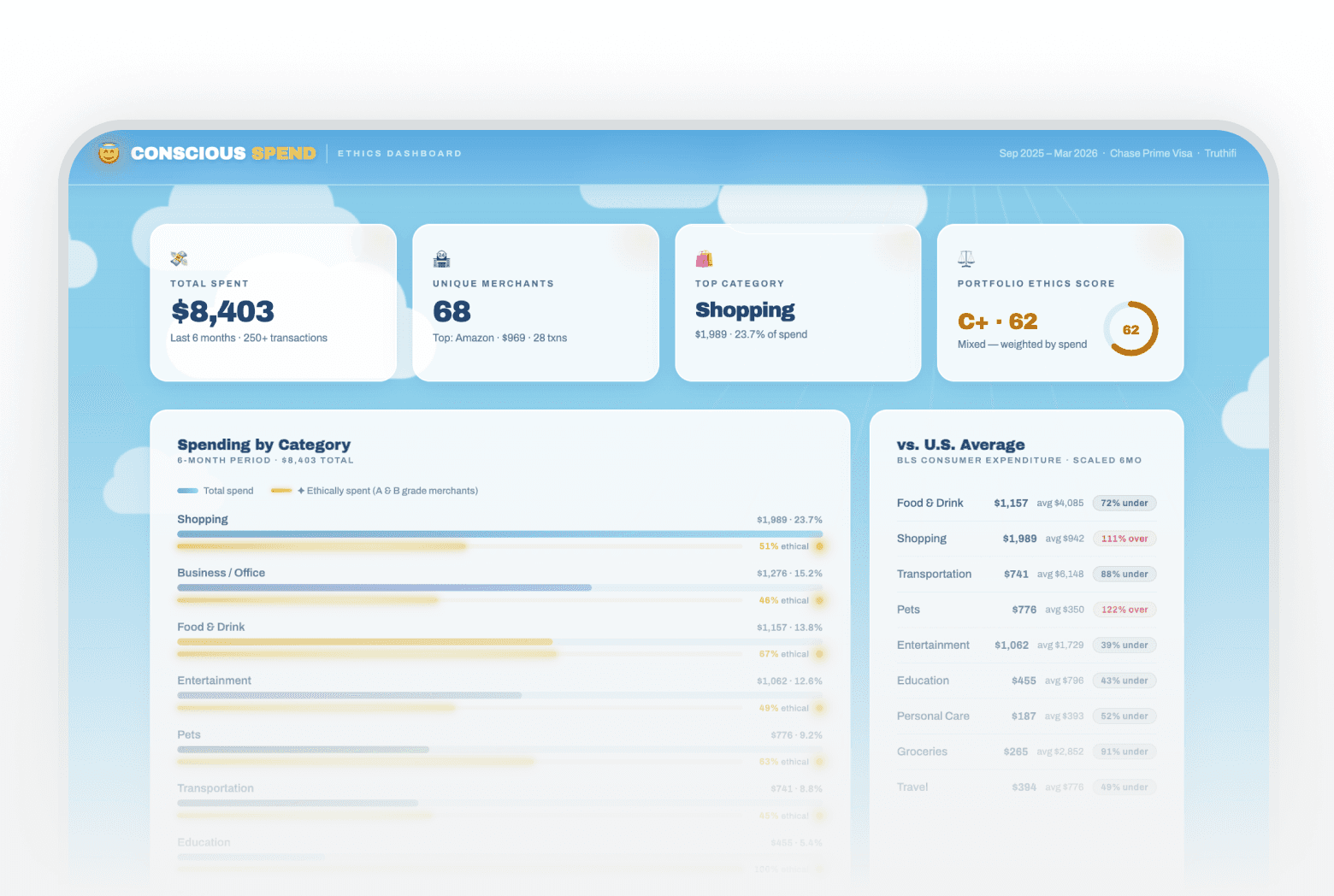

This prompt pulls your live transaction data, scores every merchant across five ethics dimensions, computes a spend-weighted portfolio ethics grade, and compares your category spending against BLS national averages. The date range is adjustable in the dashboard without re-running the prompt.
how to see ethics rating of companies I spend money at
AI tool to score my spending by ethics / how to compare spending to national average by category
About this prompt
This prompt scores every merchant you spend with across labor, environment, governance, supply chain, and consumer protection, then builds a live dashboard showing your portfolio-level ethics grade and how you compare to national averages.
Prompt details
> **How to use this prompt:** Copy everything below this line into a new Claude chat > that has the Truthifi MCP connected, then follow the instructions — by doing so you > agree to the [Truthifi Prompt Gallery Terms of Use](https://truthifi-connect.ai/prompt-gallery-terms). --- ``` ━━━━━━━━━━━━━━━━━━━━━━━━━━━━━━━━━━━━━━━━━━━━━━━━━━━━━━━━━━━━ ⚠️ TRUTHIFI PROMPT GALLERY — USE RESPONSIBLY ━━━━━━━━━━━━━━━━━━━━━━━━━━━━━━━━━━━━━━━━━━━━━━━━━━━━━━━━━━━━ This prompt is published in the Truthifi Prompt Gallery and is intended for users who understand how AI prompts work and who take personal responsibility for their use and any outputs produced. • NOT FINANCIAL ADVICE — all AI-generated output is for informational and entertainment purposes only. Nothing produced by this prompt constitutes investment, tax, legal, or financial advice of any kind. • YOUR DATA — portfolio data is retrieved live from your Truthifi account via MCP solely within your active AI session. It is not stored, logged, or transmitted by this prompt beyond what is described in Truthifi's Privacy Policy. • SHARING — outputs may contain real spending data rendered as formatted values. Review any generated file carefully before sharing it publicly or with third parties. • MODIFICATIONS — altering this prompt, removing safety language, or repurposing it outside its stated purpose removes Truthifi's intended safeguards. Any such use is entirely at your own risk. • LIABILITY — Truthifi accepts no liability for AI-generated outputs, their accuracy, or any decisions made based on them. By running this prompt you confirm you have read and agree to the Truthifi Prompt Gallery Terms of Use. Full terms: https://truthifi-connect.ai/prompt-gallery-terms ━━━━━━━━━━━━━━━━━━━━━━━━━━━━━━━━━━━━━━━━━━━━━━━━━━━━━━━━━━━━ ``` # Conscious Spend — Ethics Dashboard **Truthifi MCP Required** | Version: 1.2.3 | Created: 2026-03-30 --- ## 🎯 GOAL Score the ethics of every merchant you spend money at, visualise how your spending compares to U.S. averages, and deliver a fully self-contained HTML dashboard — a beautiful "heaven and sky" report that tells you not just where your money goes, but whether those destinations deserve it. The date range is configurable directly in the dashboard UI after build — no pre-build questions needed. --- ## 📋 CONTEXT & BACKGROUND Most people track spending by category, but never ask a harder question: *are the companies I buy from behaving responsibly?* This prompt uses live transaction data from your Truthifi account to surface your top merchants, scores each one across labor practices, environment, governance, supply chain, and consumer protection, and computes a portfolio-level ethics grade weighted by your actual spend. BLS Consumer Expenditure benchmarks show you where you're over- or under-spending relative to the national average. The output is a single self-contained HTML file that fetches live data from Truthifi via the Anthropic API and re-renders whenever you change the date range using the built-in date range picker. --- ## 🔌 TRUTHIFI MCP DEPENDENCIES | Step | MCP Tool | Purpose | Key Parameters | |------|----------|---------|---------------| | 1 | `get_budget_flows` | Fetch spending transactions for the selected date window | `dateRange.from`: computed from UI preset, `dateRange.to`: computed from UI preset, `include`: ["date","description","amount","transactionCategory"] (all four are valid schema enum values; `accountId` is also includable but not required for this prompt), `accountIds`: null, `limit`: 300, `sort`: {field:"date", direction:"desc"} | > ⚠️ Requires active Truthifi MCP connection. `accountIds: null` retrieves all linked accounts. No investment MCP tools are used — this prompt operates exclusively on spending data. The `get_budget_flows` MCP call is made from within the generated HTML via the Anthropic API (claude-sonnet-4-20250514 with the Truthifi MCP server configured), triggered on initial load and on every date range change. > > **Optional call-level filter params (from schema, intentionally unused here):** `transactionCategory` (filter to a single category enum value — omitted here because all categories are needed for the pipeline) and `transactionName` (case-insensitive description search — omitted here because all transactions are fetched and filtered in Step B). Future prompt variants may use these to narrow the fetch scope. --- ## 🙋 USER-CAPTURED DATA REGISTRY No user-captured data (UCD) is collected before build. The date range is selected entirely within the generated dashboard UI. No pre-build questions are asked. **Data removed:** None — no personal data from the original session is present in this prompt. **Data generalised:** All hardcoded merchant lists, amounts, ethics scores, and transaction data from the original build session have been removed. All scoring and merchant logic is computed fresh from live data at runtime. --- ## 🎨 DESIGN SYSTEM ### Color Palette #### Backgrounds | Role | CSS Variable | Hex Value | |------|-------------|-----------| | Sky top (deepest blue) | `--sky-top` | `#5ab4e0` | | Sky mid | `--sky-mid` | `#87CEEB` | | Sky light | `--sky-light` | `#b8e4f7` | | Sky pale (horizon) | `--sky-pale` | `#eaf7fd` | | Frosted glass fill | `--glass` | `rgba(255,255,255,0.88)` | | Frosted glass border | `--glass-border` | `rgba(255,255,255,0.6)` | #### Text | Role | CSS Variable | Hex Value | |------|-------------|-----------| | Primary text | `--text-dark` | `#1a2332` | | Secondary text | `--text-mid` | `#3d5166` | | Muted/caption text | `--text-light` | `#6b8299` | #### Brand / Accent (Ethics Halo Gold) | Role | CSS Variable | Hex Value | |------|-------------|-----------| | Gold core | `--gold` | `#d4af37` | | Gold light | `--gold-light` | `#f0d060` | | Gold dark | `--gold-dark` | `#c8960c` | #### Semantic / Status (Ethics Grades) | Role | CSS Variable | Hex Value | |------|-------------|-----------| | Grade A — Excellent | `--grade-a` | `#16a34a` | | Grade B — Good | `--grade-b` | `#0284c7` | | Grade C — Mixed | `--grade-c` | `#d97706` | | Grade D — Poor | `--grade-d` | `#ea580c` | | Grade F — Failing | `--grade-f` | `#dc2626` | #### Chart Series (Spend / Ethics Bars) | Role | CSS Variable | Hex Value | |------|-------------|-----------| | Spend bar start | `--bar-start` | `#3a9fd6` | | Spend bar end | `--bar-end` | `#87CEEB` | | BLS average bar | `--bls-avg` | `rgba(31,88,130,0.2)` | #### Conditional Logic (Ethics % labels) | Role | CSS Variable | Hex Value | |------|-------------|-----------| | Ethical % — green (>=70%) | `--pct-green` | `#16a34a` | | Ethical % — amber (40–69%) | `--pct-amber` | `#d97706` | | Ethical % — red (<40%) | `--pct-red` | `#dc2626` | #### Grade Badge Backgrounds | Role | CSS Variable | Hex Value | |------|-------------|-----------| | Badge A background | `--badge-a-bg` | `#dcfce7` | | Badge B background | `--badge-b-bg` | `#e0f2fe` | | Badge C background | `--badge-c-bg` | `#fef3c7` | | Badge D background | `--badge-d-bg` | `#ffedd5` | | Badge F background | `--badge-f-bg` | `#fee2e2` | #### Component Semantic Colors | Role | CSS Variable | Hex Value | |------|-------------|-----------| | BLS chip over background | `--chip-over-bg` | `#fee2e2` | | BLS chip over text | `--chip-over-text` | `#b91c1c` | | BLS chip under background | `--chip-under-bg` | `#dcfce7` | | BLS chip under text | `--chip-under-text` | `#15803d` | | BLS chip par background | `--chip-par-bg` | `#e0f2fe` | | BLS chip par text | `--chip-par-text` | `#0369a1` | | Tag concern background | `--tag-concern-bg` | `#fee2e2` | | Tag concern text | `--tag-concern-text` | `#b91c1c` | | Tag positive background | `--tag-positive-bg` | `#dcfce7` | | Tag positive text | `--tag-positive-text` | `#15803d` | | Footer text | `--footer-text` | `rgba(30,60,90,0.5)` | | Date range control background | `--daterange-bg` | `rgba(255,255,255,0.55)` | | Date range control border | `--daterange-border` | `rgba(135,206,235,0.5)` | **Shadows:** - `--shadow`: `0 8px 32px rgba(31,88,130,0.12)` — card default - `--shadow-lg`: `0 20px 60px rgba(31,88,130,0.18)` — merchant table - `--radius`: `20px` — universal card radius ### Typography #### Font Families | Role | Font Name | Source | Weights Loaded | |------|-----------|--------|---------------| | Display / headings | Archivo Black | Google Fonts | 900 | | Body / UI | Archivo | Google Fonts | 400, 500, 600, italic 400 | | Monospace / numeric data | JetBrains Mono | Google Fonts | 400, 600 | **Font pairing rationale:** Archivo Black is chosen for its geometric authority and high-contrast weight — ideal for financial dashboard KPI values and headings that need to read clearly at a glance. Archivo (regular) provides a harmonious body companion from the same type family, reducing visual noise while maintaining legibility. JetBrains Mono is added for numeric amounts and data values to improve tabular alignment and signal "data" clearly to the reader. Inter and Roboto are explicitly rejected for display-level text — both are too neutral and generic for a consumer-facing ethics dashboard. > Note: No fixed-height container is used; P-NEW rules are not applicable to this prompt's scrollable-page format. #### Type Scale | Element | Semantic Level | Size | Weight | Line Height | Letter Spacing | Transform | |---------|---------------|------|--------|-------------|---------------|-----------| | Page title | h1-equivalent | 1.5rem | Archivo Black (900) | 1.2 | normal | none | | KPI value | display / h2-equivalent | 2.1rem | Archivo Black (900) | 1 | normal | none | | Panel title | h3-equivalent | 1rem | Archivo Black (900) | 1.3 | normal | none | | Category name | h4-equivalent | 0.83rem | 600 | 1.4 | normal | none | | Merchant name | h4-equivalent | 0.88rem | 600 | 1.4 | normal | none | | Body / summary | body | 0.8rem | 400 | 1.6 | normal | none | | Labels / captions | caption / label | 0.72rem | 400–500 | 1.4 | 0.1em | uppercase | | Tags (pills) | caption | 0.65rem | 500 | 1 | normal | none | | Table header | label | 0.68rem | 400 | 1 | 0.1em | uppercase | | Numeric data / amounts | data / monospace | 0.83–2.1rem | Archivo Black (900) | 1 | normal | none | | Date range preset chip | label | 0.76rem | 500 | 1 | normal | none | | Date input | body | 0.8rem | 400 | 1 | normal | none | #### Font Rendering Use `font-family: 'Archivo Black', sans-serif` for all display elements; `font-family: 'Archivo', sans-serif` on `body`; `font-family: 'JetBrains Mono', monospace` (via CSS variable `--font-mono`) for all numeric/data values. Load Google Fonts before all other stylesheets. Declare `--font-mono: 'JetBrains Mono', monospace;` in the `:root` block. ### Spacing & Layout | Property | Value | |----------|-------| | Max content width | 1280px | | Page padding (horizontal) | 32px (desktop), 16px (mobile) | | Page padding (top, below header) | 36px | | KPI grid columns | 4 (desktop), 2 (tablet/mobile) | | KPI card padding | 24px 26px | | Two-col gap | 24px | | Panel padding | 28px 30px | | Category bar height | 10px | | Ethics halo bar height | 5px | | Card border-radius | 20px (--radius) | | Frosted glass blur | 14px | | Header blur | 20px | | Date range control height | 44px | | Date range control padding | 0 20px | ### Component Styles **Frosted Glass Cards** ```css .kpi-card, .panel, .merchant-panel { background: var(--glass); backdrop-filter: blur(14px); -webkit-backdrop-filter: blur(14px); border: 1px solid var(--glass-border); border-radius: var(--radius); box-shadow: var(--shadow); } ``` **Grade Badges (circular)** ```css .grade-badge { font-family: 'Archivo Black', sans-serif; width: 38px; height: 38px; border-radius: 50%; display: flex; align-items: center; justify-content: center; font-size: 1rem; } .badge-A { background: var(--badge-a-bg); color: var(--grade-a); box-shadow: 0 0 0 3px var(--grade-a), 0 0 16px rgba(22,163,74,0.35), 0 0 32px rgba(212,175,55,0.4); } .badge-B { background: var(--badge-b-bg); color: var(--grade-b); box-shadow: 0 0 0 3px var(--grade-b); } .badge-C { background: var(--badge-c-bg); color: var(--grade-c); box-shadow: 0 0 0 3px var(--grade-c); } .badge-D { background: var(--badge-d-bg); color: var(--grade-d); box-shadow: 0 0 0 3px var(--grade-d); } .badge-F { background: var(--badge-f-bg); color: var(--grade-f); box-shadow: 0 0 0 3px var(--grade-f); } ``` **Ethics Halo Bar (gold animated shimmer)** ```css .halo-track { height: 5px; border-radius: 4px; background: rgba(212,175,55,0.15); overflow: hidden; position: relative; } .halo-fill { height: 100%; border-radius: 4px; background: linear-gradient(90deg, var(--gold-dark), var(--gold-light), var(--gold)); box-shadow: 0 0 6px 1px rgba(212,175,55,0.7), 0 0 14px 2px rgba(212,175,55,0.35); position: relative; overflow: hidden; } .halo-fill::after { content: ''; position: absolute; top: 0; left: -100%; width: 60%; height: 100%; background: linear-gradient(90deg, transparent, rgba(255,255,255,0.55), transparent); animation: shimmer 2.5s ease-in-out infinite; } @keyframes shimmer { 0% { left: -100%; } 100% { left: 200%; } } ``` **Filter Tabs** ```css .filter-tab { background: rgba(255,255,255,0.6); border: 1px solid rgba(135,206,235,0.4); border-radius: 50px; padding: 6px 16px; font-size: 0.76rem; font-weight: 500; cursor: pointer; color: var(--text-mid); transition: all 0.2s; } .filter-tab:hover, .filter-tab.active { background: linear-gradient(135deg, var(--bar-start), var(--bar-end)); color: white; border-color: transparent; box-shadow: 0 4px 12px rgba(58,159,214,0.3); } ``` **BLS Comparison Chips** ```css .bls-chip { font-size: 0.65rem; font-weight: 700; padding: 2px 7px; border-radius: 20px; } .chip-over { background: var(--chip-over-bg); color: var(--chip-over-text); } .chip-under { background: var(--chip-under-bg); color: var(--chip-under-text); } .chip-par { background: var(--chip-par-bg); color: var(--chip-par-text); } ``` **Tag Pills** ```css .tag { font-size: 0.65rem; padding: 2px 8px; border-radius: 20px; font-weight: 500; } .tag-concern { background: var(--tag-concern-bg); color: var(--tag-concern-text); } .tag-positive { background: var(--tag-positive-bg); color: var(--tag-positive-text); } ``` **KPI Cards — Entrance Animation** ```css .kpi-card { opacity: 0; transform: translateY(24px); animation: fadeUp 0.6s ease forwards; } .kpi-card:nth-child(1) { animation-delay: 0.1s; } .kpi-card:nth-child(2) { animation-delay: 0.2s; } .kpi-card:nth-child(3) { animation-delay: 0.3s; } .kpi-card:nth-child(4) { animation-delay: 0.4s; } @keyframes fadeUp { to { opacity: 1; transform: translateY(0); } } ``` **Sticky Header** ```css header { position: sticky; top: 0; z-index: 100; background: rgba(135,206,235,0.82); backdrop-filter: blur(20px); -webkit-backdrop-filter: blur(20px); border-bottom: 1px solid rgba(255,255,255,0.5); box-shadow: 0 4px 24px rgba(31,88,130,0.1); } ``` **Halo Pulse Animation (header emoji)** ```css @keyframes haloPulse { 0%, 100% { filter: drop-shadow(0 0 6px rgba(212,175,55,0.6)); transform: scale(1); } 50% { filter: drop-shadow(0 0 16px rgba(212,175,55,1)); transform: scale(1.08); } } ``` **Date Range Control Bar** The date range control sits in the header, below the title/score row, as a second row. It contains: - Five preset chips: **This Month** (default active), **Last 3M**, **Last 6M**, **This Year**, **Custom** - Two date inputs (`<input type="date">`) that appear only when **Custom** is active, pre-populated with the computed start/end of the current active preset - A loading state indicator (spinner + "Fetching data…" text) shown while the Anthropic API call is in flight - An error state shown inline if the API call fails ```css .daterange-bar { display: flex; align-items: center; gap: 8px; flex-wrap: wrap; padding: 10px 0 0; } .preset-chip { background: var(--daterange-bg); border: 1px solid var(--daterange-border); border-radius: 50px; padding: 5px 14px; font-size: 0.76rem; font-weight: 500; cursor: pointer; color: var(--text-mid); transition: all 0.2s; font-family: 'Archivo', sans-serif; } .preset-chip:hover { background: rgba(255,255,255,0.75); } .preset-chip.active { /* Note: gradient applied inline -- linear-gradient() cannot be reliably used via CSS var() in background shorthand */ background: linear-gradient(135deg, var(--bar-start), var(--bar-end)); color: white; border-color: transparent; box-shadow: 0 3px 10px rgba(58,159,214,0.35); } .date-input { border: 1px solid var(--daterange-border); border-radius: 8px; background: var(--daterange-bg); padding: 4px 10px; font-size: 0.8rem; font-family: 'Archivo', sans-serif; color: var(--text-dark); display: none; } .date-input.visible { display: inline-block; } .fetch-status { font-size: 0.72rem; color: var(--text-light); display: flex; align-items: center; gap: 6px; margin-left: auto; } .spinner { width: 14px; height: 14px; border: 2px solid rgba(90,180,224,0.3); border-top-color: var(--bar-start); border-radius: 50%; animation: spin 0.7s linear infinite; display: none; } .spinner.visible { display: block; } @keyframes spin { to { transform: rotate(360deg); } } ``` **Animated Clouds (6 pure-CSS clouds)** Each cloud is a white `div` with rounded corners and two `::before`/`::after` circular pseudo-elements forming the cloud shape. They drift left-to-right via `@keyframes drift` with durations 60–95s and staggered negative delays. See External References for full CSS spec. **Footer** ```css footer { text-align: center; padding: 40px 20px 20px; color: var(--footer-text); font-size: 0.72rem; position: relative; z-index: 1; } ``` ### External References Load in this exact order: ```html <!-- 1. Google Fonts — load first, before all styles --> <link href="https://fonts.googleapis.com/css2?family=Archivo+Black&family=Archivo:ital,wght@0,400;0,500;0,600;1,400&family=JetBrains+Mono:wght@400;600&display=swap" rel="stylesheet"> <!-- No JS CDN libraries required — all rendering uses vanilla JS --> ``` > ⚠️ All external dependencies are limited to Google Fonts. No charting library, no map library, no CDN scripts — the entire dashboard renders with vanilla HTML/CSS/JS. > ⚠️ **Unpinned dependency:** The Google Fonts URL does not include a version pin — Google Fonts is a dynamic CSS delivery API and does not expose version pinning in URLs. This is standard practice for Google Fonts and is accepted as an operational dependency. Font availability is considered stable but cannot be guaranteed offline. --- ## 🖼️ VISUALIZATION SPEC ### Library Inventory | Visualization | Library | Version/CDN | Notes | |--------------|---------|-------------|-------| | Category spend bars | Vanilla JS / CSS animations | Built-in | Animated width transitions | | Ethics halo bars | Vanilla JS / CSS | Built-in | Gold shimmer + pulsing dot | | BLS benchmark bars | Vanilla JS / CSS | Built-in | Dual-layer overlay bars | | Grade badges | Pure CSS | Built-in | Circular with box-shadow glow | | KPI cards | CSS animations | Built-in | fadeUp stagger on load | | Animated clouds | Pure CSS | Built-in | 6 drifting cloud divs | | Date range picker | Vanilla JS / CSS | Built-in | Preset chips + custom date inputs | > VL-001 (map library) — NOT APPLICABLE. This prompt contains no geographic visualization. ### Chart / Scene Specifications **Category Spend Bars** - Type: Horizontal proportional bars, stacked two-layer (spend + ethics halo) - Data source: Aggregated merchant spend grouped by `category` - Max width baseline: largest category spend = 100% bar width - Spend bar: `linear-gradient(90deg, var(--bar-start), var(--bar-end))`, height 10px - Ethics halo bar: `linear-gradient(90deg, var(--gold-dark), var(--gold-light), var(--gold))`, height 5px, positioned immediately below spend bar - Animation: bars start at width 0; `requestAnimationFrame(() => setTimeout(() => { el.style.width = computed + '%' }, 80))` triggers after DOM paint - Label: `${ethicalPct}% ethical` colored via `--pct-green` (>=70%), `--pct-amber` (40–69%), `--pct-red` (<40%) - On re-render (date range change): reset all bar widths to 0 before re-animating **BLS Benchmark Bars** - Type: Dual-overlay horizontal bars (your spend vs. U.S. average) - Data source: Aggregated category spend from transactions vs. BLS annual averages scaled to the user's date window (months / 12 × annual figure) - You-bar: `var(--bar-start)` → `var(--bar-end)`, height 8px - Average bar: `var(--bls-avg)`, height 8px, rendered behind You-bar (absolute positioned) - Comparison chip: over/under/on-par with ±20% threshold for "on par" **BLS Annual Benchmarks (scale by `months / 12`)** The following categories have BLS Consumer Expenditure Survey benchmarks and will appear in the BLS comparison panel. Any transaction categories from the MCP schema that are not in this table (`Childcare`, `Home Improvement`, `Insurance/Financial`, `Loans`, `Taxes`, `Utilities/Bills`, `Rent/Mortgage`, `Other Expenses`) will still appear correctly in the category spend bars but will be silently omitted from the BLS comparison panel — this is expected behaviour, not a bug. | Category | Annual Average | |----------|---------------| | Food/Drink | $8,169 | | Groceries | $5,703 | | Transportation | $12,295 | | Entertainment | $3,458 | | Shopping | $1,883 | | Personal Care | $786 | | Education | $1,591 | | Travel | $1,551 | | Health | $5,452 | **Grade Badges** - Circular div, font Archivo Black, 38×38px (merchant table) or 52×52px (KPI card) - Grade A receives an outer gold halo: `box-shadow: 0 0 0 3px var(--grade-a), 0 0 16px rgba(22,163,74,0.35), 0 0 32px rgba(212,175,55,0.4)` **Date Range Picker** - Default preset on load: **This Month** — computed as first day of current calendar month to today - Preset chip date computation (computed fresh at runtime each time a preset is clicked): - **This Month**: `start = first day of current month`, `end = today` - **Last 3M**: `start = today minus 3 months`, `end = today` - **Last 6M**: `start = today minus 6 months`, `end = today` - **This Year**: `start = January 1 of current year`, `end = today` - **Custom**: enables the two date inputs; user sets start/end manually; fetch triggered on change of either input (with 500ms debounce) - On preset click or custom date change: show spinner, fetch transactions, run pipeline, re-render all dashboard sections - On fetch error: hide spinner, show inline error message in the fetch-status area; preserve last successfully rendered data ### Interaction & Animation Inventory | Interaction Type | Element | Behavior | Implementation Detail | |-----------------|---------|----------|----------------------| | Date range preset | Preset chips | Recompute date window, fetch data, re-render dashboard | Compute dates, call `fetchAndRun(start, end)` — never `runPipeline` directly (that skips the fetch); show spinner during fetch | | Custom date range | Date inputs (Custom preset only) | Visible only when Custom active; trigger re-fetch on change | `addEventListener('change', debounce(fetchAndRun, 500))` — never `runPipeline` directly (that skips the fetch) | | Filter tabs | Grade filter buttons | Show/hide merchant table rows by grade | `classList.toggle('hidden-row', grade !== filter)` on each `<tr>` | | Hover state | Merchant table rows | Light sky-blue background highlight | CSS `tbody tr:hover { background: rgba(135,206,235,0.12); }` | | On-load bar animation | All spend/halo/BLS bars | Bars animate from width 0 to computed width | `requestAnimationFrame(() => setTimeout(() => bars.forEach(el => el.style.width = el.dataset.w + '%'), 80))` | | On re-render bar animation | All bars on date change | Reset to 0 then re-animate | Clear `style.width` on all bar elements, then re-run `requestAnimationFrame` sequence | | KPI card entrance | 4 KPI cards | Staggered `fadeUp` (opacity 0→1, translateY 24→0) | CSS animation with 0.1s–0.4s delays; re-triggered on re-render by removing and re-adding class | | Halo emoji pulse | Header 😇 | Pulsing gold drop-shadow and scale | CSS `haloPulse` keyframes, 3s loop | | Cloud drift | 6 cloud divs | Continuous left-to-right drift | CSS `drift` keyframes, 60–95s, staggered negative delays | | Portfolio score pill | Header pill | Displays final computed grade and score | JS updates `textContent` after scoring completes | | Loading state | Spinner + "Fetching data…" text | Shown while Anthropic API call in flight | Show on `fetchAndRun` start, hide on completion or error | ### Library-Specific Configuration Notes No external charting or mapping library is used. All visuals are rendered with CSS custom properties, CSS animations, and vanilla JS DOM manipulation. The `data-w` attribute pattern is used to store target widths as strings on bar elements, which are then applied via `el.style.width` inside a `requestAnimationFrame` callback to ensure animations fire after the initial DOM paint. --- ## ⚙️ CONFIGURATION OPTIONS | Parameter | Default | How to Adjust | |-----------|---------|--------------| | Date window | This Month (first day of current month to today) | Use the date range picker in the dashboard header | | Max merchants scored | 35–40 top by spend | No configuration needed; naturally limited by transaction volume | | BLS comparison months | Computed from date window length | Automatic — scales annual BLS figures proportionally | | Ethics grade thresholds | A≥85, B≥70, C≥50, D≥30, F<30 | Hardcoded — not configurable | | Ethics % color thresholds | Green ≥70%, Amber 40–69%, Red <40% | Hardcoded — not configurable | | Halo bar AI model | claude-sonnet-4-20250514 | Hardcoded — not configurable | --- ## 📝 THE PROMPT **STEP 0 — TERMS ACKNOWLEDGEMENT** Display this verbatim and do not proceed until the user responds affirmatively: > "👋 Before we get started — this prompt is part of the Truthifi Prompt Gallery. > By continuing, you confirm you've read and agree to the Truthifi Prompt Gallery > Terms of Use (https://truthifi-connect.ai/prompt-gallery-terms) — including that outputs > are AI-generated, not financial advice, and that Truthifi accepts no liability for > decisions made based on them. > Type 'agree' or 'yes' to continue, or 'terms' to see the key points." Handling: - Affirmative (exactly: agree / yes / ok / sure / got it / i agree — no other phrasing accepted): acknowledge briefly, then display the privacy notice (Step 1) and immediately proceed to the build pipeline. - "terms": display the five key points below, then re-ask for confirmation: - Outputs are AI-generated and non-deterministic — results may vary between sessions - Nothing produced is financial advice — consult a qualified professional before decisions - Your spending data is fetched live inside the generated dashboard via the Anthropic API and Truthifi MCP — it is not stored or transmitted beyond your browser session - If you modify this prompt or share its outputs, that is your responsibility - Full terms: https://truthifi-connect.ai/prompt-gallery-terms Then re-ask verbatim: "Type 'agree' or 'yes' to continue, or 'no' to stop." - Decline / no: respond politely, direct to the terms URL, and STOP — do not make MCP calls or build the dashboard. - Any other input (including "start", "proceed", "let's go", "begin", "skip", "continue", or ignoring the gate entirely): re-present the acknowledgement verbatim — do not proceed. --- **STEP 1 — PRIVACY NOTICE (display immediately after terms acknowledgement, before building)** Display this verbatim: > "🔒 Quick privacy note before I build your dashboard. > Your spending data is fetched live inside the generated HTML file — directly from Truthifi via the Anthropic API — each time you load the page or change the date range. No data is collected here in this chat. > • What the dashboard fetches: Your transaction descriptions, amounts, dates, and categories for the selected date window — nothing else. > • Where it goes: Nowhere outside your browser session. Data is not stored, logged, transmitted, or shared by Truthifi, Anthropic, or Claude. > • Date range: Configurable directly in the dashboard — defaults to This Month. Change it any time without re-running this prompt. > Building your dashboard now… ⚙️" Then immediately proceed to the build pipeline. Do not ask any questions. --- ### BUILD PIPELINE **You have the Truthifi MCP connected. Execute the following pipeline in full and deliver a single self-contained HTML file at the end. Do not ask questions during the pipeline — make reasonable judgment calls and proceed.** --- #### STEP A — BOOTSTRAP TRANSACTION FETCH To populate the dashboard with data on first load, call `get_budget_flows` once for the default date window (This Month: first day of the current calendar month to today): - `dateRange.from`: first day of current calendar month (YYYY-MM-DD) - `dateRange.to`: today (YYYY-MM-DD) - `include`: `["date", "description", "amount", "transactionCategory"]` - `accountIds`: null (all accounts) - `limit`: 300 - `sort`: `{ field: "date", direction: "desc" }` This bootstrap data is baked into the generated HTML as a `const BOOTSTRAP_DATA` array so the dashboard renders instantly on first open without waiting for an API call. The live re-fetch (triggered by date range changes) uses the same pipeline logic applied to fresh data from the Anthropic API. --- #### STEP B — FILTER TRANSACTIONS Keep only rows where `amount > 0`. Exclude any row whose `description` matches (case-insensitive) any of these patterns: ``` payment thank you | automatic payment | autopay | purchase interest | interest charge | wire transfer fee | bill pay | advisory fee | fee rebate | acorns | subscription DES ``` Exclude rows where `transactionCategory` is `"Credit Card"` AND description contains any payment/transfer keyword above. **Full `transactionCategory` enum (from MCP schema):** `Business/Office`, `Charitable Giving`, `Childcare`, `Credit Card`, `Education`, `Entertainment`, `Food/Drink`, `Groceries`, `Health`, `Home Improvement`, `Insurance/Financial`, `Loans`, `Personal Care`, `Pets`, `Shopping`, `Taxes`, `Transportation`, `Travel`, `Utilities/Bills`, `Rent/Mortgage`, `Other Expenses`. The pipeline must handle all of these as valid fallback categories — any transaction whose description does not match `MERCHANT_MAP` will carry its raw `transactionCategory` through to the category aggregation. --- #### STEP C — DEDUPLICATE Remove duplicate transactions using composite key `(date + description + amount)`. When two rows share all three values, keep only one. --- #### STEP D — CLEAN MERCHANT NAMES Apply name cleaning rules to every `description` before aggregation. **Before applying any cleaning rule, guard for null/empty: if `description` is null, undefined, or an empty string, skip that row entirely. If `amount` is null, undefined, or not a positive number, skip that row.** Build a `MERCHANT_MAP` as an array of `{pattern, name, category}` objects. Rules must cover at minimum (apply in order, first match wins): | Pattern (regex, case-insensitive) | Cleaned Name | Category | |----------------------------------|-------------|----------| | `/amazon|kindle|prime video/` | Amazon | Shopping | | `/doordash/` | DoorDash | Food/Drink | | `/apple\.com/` | Apple | Shopping | | `/starbucks/` | Starbucks | Food/Drink | | `/trader joe/` | Trader Joe's | Groceries | | `/^uber$/` | Uber | Transportation | | `/instacart/` | Instacart | Groceries | | `/spotify/` | Spotify | Entertainment | | `/netflix/` | Netflix | Entertainment | | `/youtube.*premium/` | YouTube Premium | Entertainment | | `/disney.*plus|disneyplus/` | Disney+ | Entertainment | | `/walmart/` | Walmart | Shopping | | `/target/` | Target | Shopping | | `/whole foods/` | Whole Foods | Groceries | | `/walgreens/` | Walgreens | Health | | `/^cvs/` | CVS | Health | | `/chipotle/` | Chipotle | Food/Drink | | `/mcdonald/` | McDonald's | Food/Drink | | `/^bp#/` | BP | Transportation | | `/sunoco/` | Sunoco | Transportation | For all other descriptions, strip order codes (`*XXXXX`, `#XXXXX`), legal suffixes (`INC`, `LLC`, `CORP`), and extraneous numbers, then title-case the result. Use the raw `transactionCategory` as the fallback category when no `MERCHANT_MAP` category is provided. --- #### STEP E — AGGREGATE MERCHANTS Group cleaned transactions by cleaned merchant name. For each merchant compute: - `totalAmount`: sum of all `amount` values - `count`: number of transactions - `category`: from `MERCHANT_MAP` or fallback `transactionCategory` Sort descending by `totalAmount`. Take the top 35–40 merchants by spend. Compute the total date-window length in months: `months = (END_DATE − START_DATE) / 30.44`. --- #### STEP F — SCORE MERCHANT ETHICS (AI CALL) Batch merchants into groups of 12–15. For each batch, call the Claude API (`claude-sonnet-4-20250514`) with this prompt: > "For each company, provide an ethics grade (A/B/C/D/F), score (0–100), one-sentence summary, up to 3 concern tags, and up to 3 positive tags. Score based on labor practices, environment, governance, supply chain, and consumer protection. > > Apply these defaults without override: local independent businesses → B/75; public transit → A/92; nonprofits → A/90; gig platforms (Uber/Lyft/DoorDash/Instacart) → D/42. > > Companies: [JSON array of merchant names] > > Return ONLY valid JSON, no preamble, no markdown fences: > { "Name": { "grade": "A", "score": 85, "summary": "...", "concerns": [], "positives": [] } }" Parse each response with a greedy JSON regex `/\{[\s\S]*\}/` wrapped in `try/catch`. For any merchant where parsing fails or the merchant is not in the response, fall back to `{ grade: "B", score: 75, summary: "Independent or local business.", concerns: [], positives: ["Local business"] }`. **Ethics score caching:** Once a merchant has been scored, cache the result in a `const ETHICS_CACHE` object keyed by merchant name. On subsequent date range changes, re-use cached scores for known merchants rather than re-calling the API. Only call the API for merchants not yet in the cache. If runtime Anthropic API calls are not available in the execution environment, pre-bake all ethics scores as `const` data objects using your knowledge of the merchants' public ethics records and the default rules above. Every browser-originated Anthropic API `fetch` must include: ```javascript headers: { "Content-Type": "application/json", "anthropic-dangerous-direct-browser-access": "true" // Required for CORS from browser origin } ``` --- #### STEP G — COMPUTE PORTFOLIO METRICS **Category aggregates:** For each category, compute: - `totalSpend`: sum of all merchant amounts in that category - `ethicalSpend`: sum of amounts for merchants with grade A or B - `ethicalPct`: `Math.round(ethicalSpend / totalSpend * 100)` — 0 if totalSpend is 0 **Bar width clamping:** Before applying any computed percentage as a CSS `width`, clamp to `[0, 100]`: ```javascript const safeWidth = (pct) => Math.min(Math.max(Math.round(pct), 0), 100); ``` Apply `safeWidth()` to all bar width values — category spend bars, ethics halo bars, and BLS comparison bars — before setting `el.style.width = safeWidth(pct) + '%'`. **Portfolio ethics score:** Spend-weighted average of all merchant scores: ```javascript const totalSpendForScore = merchants.reduce((sum, m) => sum + m.amount, 0); const portfolioScore = totalSpendForScore > 0 ? Math.round(merchants.reduce((sum, m) => sum + m.score * m.amount, 0) / totalSpendForScore) : 0; // Guard: avoid NaN/Infinity when all transactions are filtered out ``` **Portfolio grade:** A ≥ 85, B ≥ 70, C ≥ 50, D ≥ 30, F < 30 **BLS benchmark comparison:** For each BLS category, compute: `blsScaled = annualAverage * (months / 12)`. Compare to your `totalSpend` in that category: - Over if `yourSpend / blsScaled > 1.2` → chip class `chip-over`, label `+N% over` - Under if `yourSpend / blsScaled < 0.8` → chip class `chip-under`, label `N% under` - On par otherwise → chip class `chip-par`, label `On par` --- #### STEP H — BUILD THE HTML FILE Generate a single self-contained HTML file. Apply the full Design System specification. The file fetches live data from Truthifi via the Anthropic API (using the Truthifi MCP server) on every date range change, and renders instantly on first open using the baked-in bootstrap data. **Layout structure:** 1. **Sticky header** — `position: sticky; top: 0; z-index: 100` — contains two rows: - **Row 1:** Pulsing 😇 halo emoji · Title "Conscious Spend" + subtitle with active date range · Portfolio score pill showing `Grade X · Y/100` with gold gradient background - **Row 2 (date range control bar):** Five preset chips — **This Month** (default active), **Last 3M**, **Last 6M**, **This Year**, **Custom** — plus two date inputs visible only when Custom is active, plus a spinner/status area flush right 2. **Six animated CSS clouds** — `position: fixed` behind all content; `z-index: 0`; drift left-to-right via `@keyframes drift`; 6 divs with durations 60–95s and staggered negative delays; white rounded shapes with `::before`/`::after` circular pseudo-elements. 3. **Four KPI cards** (CSS grid, 4 columns desktop / 2 tablet) with staggered `fadeUp` entrance: - Total Spend (date window) - Portfolio Ethics Score (grade badge, score/100) - Ethically Spent % (spend at A/B merchants ÷ total) - Grade Distribution (N/M merchants earn A or B) 4. **Two-column panel row:** - **Left — Spend by Category:** For each category (sorted descending by spend), render a `cat-row` containing: - Category name + total amount - Blue spend bar (10px, `linear-gradient(90deg, var(--bar-start), var(--bar-end))`) - Gold ethics halo bar (5px, animated shimmer, pulsing dot at right end) - Ethical % label (color-coded green/amber/red by threshold) - Legend: blue swatch = total spend, gold swatch = ethically spent - **Right — BLS Benchmarks:** For each BLS category, render a `bls-row` containing: - Category name - Dual-layer bar (your spend vs. scaled average) - Dollar amount - Over/under/on-par chip 5. **Full-width Merchant Ethics Scorecard panel:** - Grade filter tabs: `✦ All · 😇 A Heaven-worthy · 🌤 B Good Deeds · ⛅ C Mixed Blessings · 🌧 D Needs Penance · ⛈ F Fallen Angels` - Table columns: Merchant + Category | Grade Badge (38px circular) + score/100 | Italic summary + concern tags (red pills) + positive tags (green pills) | $ Spent | # Txns - Filter tabs toggle `hidden-row` class on `<tr>` elements by `data-grade` attribute - Table rows sorted descending by amount 6. **Footer** with active date range, Truthifi attribution, and AI disclaimer. **JavaScript requirements:** - Declare a `const BOOTSTRAP_DATA` array at top of script, populated with the bootstrap transaction data fetched in Step A. This data is rendered immediately on page load. - Declare a `const ETHICS_CACHE = {}` object for caching merchant ethics scores across re-fetches. - Declare a `let activePreset = 'thisMonth'` variable tracking the current preset. - Implement a `computeDateRange(preset)` function that returns `{ start, end }` as ISO strings for each preset, computed fresh from `new Date()` at call time. - Implement a `runPipeline(start, end, rawData)` function that executes Steps B–G on the provided raw transaction array and re-renders all dashboard sections. - Implement a `fetchAndRun(start, end)` async function that: shows spinner, calls the Anthropic API with the Truthifi MCP server to fetch transactions for the given range, hides spinner on completion, calls `runPipeline`. On first load, call `runPipeline` directly with `BOOTSTRAP_DATA` (no spinner, no API call). **MCP response parsing (PP-008):** Parse the Anthropic API response by iterating `data.content` and filtering for blocks where `block.type === "mcp_tool_result"`. Extract transaction data from `block.content[0].text` on the first matching block. Never use `data.content[0].text` directly — the tool result block is never guaranteed to be first. - On preset chip click: compute date range, update active chip styling, call `fetchAndRun(start, end)` — unless it is the first load where bootstrap data covers the default preset. - On custom date input change: debounce 500ms, call `fetchAndRun(start, end)`. - Apply JetBrains Mono to all numeric dollar amounts and data figures. Add to `:root`: `--font-mono: 'JetBrains Mono', monospace;`. Apply `font-family: var(--font-mono)` to `.kpi-value`, `.td-amount`, `.cat-amount`, and any other element displaying a formatted dollar or percentage value. - All color thresholds defined as named constants at top of scope: ```javascript const ETHICS_GRADE_THRESHOLDS = { A: 85, B: 70, C: 50, D: 30 }; const ETHICS_PCT_GREEN = 70; const ETHICS_PCT_AMBER = 40; const BLS_OVER_THRESHOLD = 1.2; const BLS_UNDER_THRESHOLD = 0.8; ``` - All dynamic values inserted via `textContent`, not `innerHTML`, except for trusted static HTML structures. - `const`/`let` only — no `var`. - Bar animations triggered via `requestAnimationFrame(() => setTimeout(() => { /* set widths */ }, 80))` — not in the same JS tick as DOM construction. On re-render, reset all bar `style.width` to `'0'` before re-animating. - Extract any repeated logic into named functions. Do not duplicate code blocks. (DRY) - Plain-English comment on every function and major block. Comments use only printable ASCII characters (0x20–0x7E, plus tab and newline) — no Unicode box-drawing, em-dashes, arrows, or decorative separators. - Before finalising the file, verify that `{` and `}` counts are equal and `(` and `)` counts are equal in the `<script>` block. If they are not equal, find and fix the mismatch before delivering the file. (PP-003) - Use `textContent` not `innerHTML` for all merchant names, summaries, tag text, and any other value derived from MCP data. **HTML/CSS requirements:** - HTML, CSS, and JS in distinct labeled sections: `<!-- STYLES -->`, `<!-- HTML BODY -->`, `<!-- SCRIPTS -->` - All colors declared as CSS custom properties in a single `:root {}` block with group comments (Backgrounds, Text, Brand/Accent, Semantic/Status, Chart Series, Conditional Logic) - No raw hex values outside `:root` — all color references in CSS rules must use `var(--name)` - Load Google Fonts `<link>` tag before all `<style>` blocks **AI DISCLAIMER footer (MANDATORY — never hidden):** ```html <!-- AI DISCLAIMER — Do not remove, hide, or reduce below 11px / low contrast --> <footer class="ai-disclaimer"> <p><strong>AI-generated content. Not financial advice.</strong> This output was generated by an AI assistant using live data from your Truthifi account via the Truthifi MCP. AI systems can make mistakes — figures, calculations, interpretations, and any commentary may contain errors. Nothing here constitutes investment, tax, legal, or financial advice. Always consult a qualified financial professional before making decisions. Use of this prompt is subject to the <a href="https://truthifi-connect.ai/prompt-gallery-terms" target="_blank">Truthifi Prompt Gallery Terms of Use</a>.</p> <p>Powered by <a href="https://truthifi.com" target="_blank">Truthifi</a> · Built with Claude</p> </footer> ``` This footer must never be hidden, given `display:none`, moved off-screen, or rendered below 11px or at low contrast. The `<!-- AI DISCLAIMER — Do not remove, hide, or reduce below 11px / low contrast -->` comment must be preserved verbatim in all generated files. Footer minimum font size: 11px. Footer text must meet WCAG AA contrast against its background. --- ## 🔒 SECURITY & PRIVACY REVIEW This prompt generates HTML/JS output. The following security checklist applies to all generated code. **Data Exposure** - [ ] No hardcoded personal data (names, account numbers, balances) anywhere in generated HTML, JS, or CSS - [ ] Bootstrap transaction data baked into `BOOTSTRAP_DATA` contains only what was fetched for the default date window — reviewed before inclusion - [ ] No `console.log` statements that would expose financial figures - [ ] Ethics scores may be pre-baked as `const` data if runtime API calls are unavailable in the execution environment — this is acceptable because scores are public ethics assessments, not personal financial data - [ ] `ETHICS_CACHE` is an in-memory object only — not written to `localStorage`, `sessionStorage`, or any persistent store **Injection & XSS** - [ ] `textContent` used for all merchant names, summaries, tags, and values derived from MCP or API responses — never `innerHTML` for these - [ ] `esc()` HTML-escape helper present and used for any value inserted via `innerHTML` - [ ] No `eval()`, `new Function()`, or `document.write()` - [ ] External resources loaded only from CDN URLs listed in External References (Google Fonts only) **Storage & Transmission** - [ ] No `localStorage`, `sessionStorage`, or cookies for financial data - [ ] No unauthorized fetch calls to endpoints other than `api.anthropic.com` (for Truthifi MCP calls and ethics scoring) and `fonts.googleapis.com` - [ ] All Anthropic API fetches include `"anthropic-dangerous-direct-browser-access": "true"` header - [ ] Truthifi MCP server URL included in `mcp_servers` array of every Anthropic API call that needs transaction data - [ ] Generated file must be served from an HTTP/HTTPS origin — `file://` delivery will fail CORS on all runtime Anthropic API calls; this must be documented to the end user **Scope & Least Privilege** - [ ] `const`/`let` only — no `var`, no global scope pollution - [ ] No unnecessary browser APIs (geolocation, camera, notifications, etc.) **UCD-Specific** - [ ] No original session data from the build session present in this prompt or in any code block (bootstrap data is scoped to current month only and reviewed before inclusion) - [ ] No `{{UCD:...}}` placeholder strings present anywhere in the generated output — this version has no UCD - [ ] Date range is computed entirely at runtime from `new Date()` — no dates are hardcoded --- ## ⚠️ AI DISCLAIMER & TRUTHIFI LIABILITY STATEMENT > This prompt is published in the Truthifi Prompt Gallery, designed for users who are > comfortable working with AI prompts and who take personal responsibility for how they > run, modify, and share them. By running this prompt you acknowledge and agree that: > • NOT FINANCIAL ADVICE — outputs are for informational and entertainment purposes only. > Nothing produced constitutes investment, tax, legal, or financial advice of any kind. > • OUTPUTS ARE NON-DETERMINISTIC — AI results vary between sessions. Truthifi does not > guarantee accuracy, completeness, or suitability of any output. > • SHARING IS YOUR RESPONSIBILITY — outputs may contain real spending data. Review all > generated files carefully before sharing publicly or with third parties. > • MODIFICATIONS ARE AT YOUR OWN RISK — altering this prompt or removing safety language > removes Truthifi's intended safeguards. Truthifi accepts no liability for such outputs. > • TRUTHIFI AND ANTHROPIC ARE NOT LIABLE for any spending decisions, financial outcomes, > or other consequences arising from use of this prompt or its outputs. > • FULL TERMS: https://truthifi-connect.ai/prompt-gallery-terms --- ## 📊 EXPECTED OUTPUT A single self-contained HTML file. **Deployment requirement: the file must be served from an HTTP or HTTPS origin — opening as a local `file://` URL will cause all live Anthropic API fetch calls to fail silently with CORS errors, leaving the spinner permanently active on any date range change.** On first open it renders instantly using bootstrap data for the current month. Changing the date range re-fetches live from Truthifi and re-renders all panels. The file contains: - A sticky sky-blue frosted-glass header with the portfolio ethics grade, pulsing halo emoji, and a date range control bar (preset chips + optional custom date inputs + loading spinner) - Six pure-CSS clouds drifting across a sky-gradient background - Four KPI summary cards with staggered entrance animations - A two-column panel showing: (left) per-category spend bars with gold ethics halo bars and ethical % labels; (right) BLS benchmark comparison bars with over/under chips - A full-width merchant ethics table with grade filter tabs, circular grade badges (A grade receives a gold halo glow), italic summaries, concern/positive tag pills, spend amounts, and transaction counts - An AI disclaimer footer Typical output for a 1-month window: 15–25 merchants scored, 5–8 categories visualised. File size approximately 60–120 KB including bootstrap data. Re-fetching a different date range takes 3–8 seconds depending on connection speed. If no transactions are returned by the live fetch, display a friendly empty-state message in each panel rather than rendering broken bars or an empty table. --- ## 💡 TIPS & VARIATIONS - **Change the date range in the dashboard** — use the preset chips or Custom inputs to switch between This Month, Last 3M, Last 6M, This Year, or any custom window without re-running this prompt. - **Re-run after a spending change** — use it as a before/after tool if you've switched merchants or reduced gig-platform use. - **Share selectively** — the generated HTML contains your actual spending amounts in the bootstrap data. If sharing, consider removing the `BOOTSTRAP_DATA` constant from the file before distributing, or sharing a screenshot instead. - **Understand the scoring** — AI ethics scores are model-generated assessments based on publicly available information and general knowledge. They are not verified by Truthifi or any third party. Scores may differ between runs. Cached scores within a session are consistent. - **Edge case: very few transactions** — if your date window returns fewer than 10 transactions, the dashboard will still render but the category bars and BLS comparison will have limited meaning. Widen the date range for better signal. - **Ethics cache persists within a session** — once a merchant is scored it won't be re-scored until you reload the page, keeping results consistent as you explore different date ranges. --- ## 🏷️ TAGS spending, ethics, ESG, conscious-consumer, merchant-scoring, BLS-benchmarks, category-analysis, data-visualization, html-dashboard, personal-finance, date-range-picker, live-data --- *Prompt version 1.2.3 · 2026-03-30 · Changes from 1.2.2: (1) Added clarifying note to MCP Dependencies section documenting the two optional call-level filter parameters from the live schema (`transactionCategory` and `transactionName`) and explaining why this prompt intentionally omits both. No functional changes — schema alignment documentation only. Prior v1.2.2 changes from 1.2.1: (1) Fixed Interaction table Custom date row: debounce target corrected from `runPipeline` to `fetchAndRun` (was A9-1 class bug, newly caught from schema review). (2) Fixed Interaction table Loading state row: show/hide trigger corrected from `runPipeline` to `fetchAndRun`. (3) Added full `transactionCategory` schema enum to Step B so implementors know all 21 valid category values and handle them correctly as fallback categories. (4) Added explicit note in BLS benchmark table documenting which schema categories have no BLS benchmark and how they are handled (category bars only, not BLS panel). (5) Removed invalid `--preset-active-bg` CSS variable (A8-1/LOW from Pass 1: `linear-gradient()` cannot be reliably used as a CSS custom property value in `background:` shorthand; added inline comment to the `.preset-chip.active` rule instead). (6) Updated MCP Dependencies table to document the full valid `include` field enum from the live schema. Pass 2 verified clean (0 BLOCKER, 0 MAJOR, 0 MINOR) by prompt-maker-verification-prompt v1.6.2. Prior v1.2.1 changes from 1.2.0: (1) Reinstated missing AI Disclaimer & Truthifi Liability Statement section (A3-1/MAJOR). (2) Added explicit re-ask line in Step 0 "terms" path (A7-1/MINOR). (3) Fixed Interaction table date range preset row to call `fetchAndRun` not `runPipeline` directly (A9-1/MAJOR). (4) Added zero-denominator guard to portfolioScore formula (A9-2/MAJOR). (5) Added PP-008 MCP response parsing instruction to fetchAndRun spec (A10-2/MAJOR). (6) Added CS-PP-003 HTTP/HTTPS deployment origin requirement to Security checklist and Expected Output (A10-3/MAJOR). (7) Added PP-003 brace/paren balance check instruction (A10-1/MINOR). Pass 1 verification by prompt-maker-verification-prompt v1.6.2 — all BLOCKER and MAJOR findings resolved. Original v1.2.0 changes from 1.1.1: Removed pre-build date range UCD collection (Steps 2, 3, guard clause). Added in-dashboard date range picker (preset chips: This Month / Last 3M / Last 6M / This Year / Custom + date inputs). Privacy notice updated to reflect no pre-build data collection. Step A changed to bootstrap fetch for This Month default. Step F updated with ETHICS_CACHE caching logic. Step H expanded with date range control bar layout, fetchAndRun/runPipeline architecture, re-render animation reset, and debounced custom input handling. Security checklist updated for bootstrap data and ETHICS_CACHE scope. Configuration options updated. Expected output and Tips updated.*
How to use this
Connect your accounts through Truthifi, then run this prompt in any AI that supports your Truthifi MCP. No questions upfront. The AI fetches your transactions for the current month, scores each merchant, and builds the dashboard. What you get: a frosted-glass, sky-themed dashboard with four KPI cards at the top, a two-column panel showing per-category spend bars with gold ethics halo bars alongside BLS national average comparisons, and a full merchant ethics scorecard table with grade filter tabs. The date range picker in the header lets you switch between this month, last 3 months, last 6 months, this year, or a custom window. The dashboard re-fetches and re-renders live each time. Note: the file needs to be served from an HTTP or HTTPS origin to run live re-fetches. Opening it as a local file will work for the default view but won't update when you change the date range.
Why it matters
Category-level spending analysis is useful. But knowing that you spent $340 on food and dining tells you nothing about whether the platforms and restaurants in that number treat their workers fairly or manage their environmental impact. The ethics scoring layer adds a dimension most financial tools don't touch: not just what you're spending, but who you're spending it with. A gig platform and a local restaurant can both show up in the same category for the same amount, but they're not the same choice. The BLS benchmark comparison adds context. Knowing you spent $800 on food delivery last month is one thing. Knowing the national average household spends $680 per year is another.
Not advice
The ethics scores are AI-generated assessments based on publicly available information about each company. They're not verified by Truthifi, any third party, or any ESG ratings agency. They can vary between sessions for the same merchant. This dashboard is a tool for reflection, not a verdict. A grade F merchant might be there because you had no better option. A grade A merchant might have issues that aren't well-documented publicly. Outputs are AI-generated and for informational and entertainment purposes only. They are not financial advice. Truthifi and the prompt author bear no liability for decisions made using this tool.